Activity
Mon
Wed
Fri
Sun
Nov
Dec
Jan
Feb
Mar
Apr
May
Jun
Jul
Aug
Sep
Oct
What is this?
Less
More
Accelerator University
10k
Free
Lead Gen Secrets
25k
Free
Clinician Growth Blueprint™
6.2k
Free
The Halal Network
36.2k
Free
Paid Media Lab
1.8k
Free
Agency Flywheel Hub
4.7k
Free
The Real Estate Academy
4.3k
Free
Brendan's AI Community
27.6k
Free
ACS AI Academy
287
Free
24 contributions to Wifi Life

3d •
I replaced GoHighLevel + 4 other tools with one custom CEO Dashboard (full walkthrough)
"Why are we paying for 5 different software subscriptions just to understand how our business performed today?" That one question started this project. Like many teams, we ran our sales pipeline on GoHighLevel (GHL) plus external spreadsheets. It worked, until our remote team grew and the cracks started to show: - Too many tabs open just to check one client's status - Setups so complicated they slowed down our cold-calling reps - No built-in way to track genuine remote shift activity - Invoices and sales numbers sitting in separate silos Instead of paying recurring fees for tools that solved only about 60% of our workflow, I built a focused, custom CRM designed for one thing: leadership clarity. 🎥 In the video below, I walk through the CEO Dashboard, the central cockpit of our entire operation: 🔹 Live Pulse Overview | CEO Dashboard Real-time closed revenue, active pipeline value, and team performance in one view. 🔹 Sales Accountability | Idle Tracker A 10-minute idle tracker built specifically for remote 9-hour shifts. 🔹 Campaign Workspaces | Cold-Calling CRM Segmented campaign folders for rapid calling, note tracking, and no duplicate leads cluttering the list. 🔹 Native Invoicing & Checkout | Billing Inside the CRM Invoices are generated in the platform and logged directly into each client's history. The real win is that sales activity, team accountability, and billing now live in one connected system. Leadership checks one screen instead of five. 🛠️ Built with: Next.js, Supabase, and AI-assisted development (Claude, ChatGPT, Gemini). Custom software completely changed our operational speed. No bloat, just the exact levers our business needs to scale. You can also email me: [email protected]

Jan 23 •
AI Cold-Calling Voice Agent — Handling Rejection (Episode 3)
This is Episode 3 of my AI Cold-Calling Voice Agent series. In this demo, the AI agent handles “not interested” responses cleanly — something most human callers struggle with. The agent: - Respects boundaries - Ends the call professionally - Keeps the brand intact Built using VAPI + AI automation workflows. If you’re building AI agents for sales, outreach, or service businesses, happy to break down the logic behind this behavior.
1
0


Jan 7 •
How I built an "AI-Research Assistant" that saves 10+ hours a week (and tracks every competitor)
Let’s be real—manually tracking YouTube competitors is a massive time-sink. I see so many creators and agency owners spending hours every week jumping between tabs, checking view counts, and trying to "guess" what content is actually trending. That’s a waste of high-level talent. I decided to solve this with a 2-part n8n automation engine. Now, the data comes to me. Here’s the breakdown of the system: 1️⃣ The Data Harvester: It monitors a list of target channels in Google Sheets. Every time a new video drops, it automatically pulls the views, likes, comments, and tags. No more manual data entry. 2️⃣ The Outlier Detector: This is where the ROI happens. The system calculates the average performance of a channel and only alerts me when a video is an "outlier" (performing way above average). 3️⃣ The Intel Report: It generates a professional HTML newsletter and drops it in my inbox. I can see the "viral signals" while I’m drinking my morning coffee. ☕ The ROI? Time: 10+ hours/week saved (that's 40+ hours a month to focus on high-ticket sales). Money: Replaces the need for a $1,500/month research assistant. Strategy: You stop guessing and start creating content that is backed by real-time competitor data. I’m curious—how many of you are still tracking your market research manually? If you want to see a walkthrough of how the nodes are set up or want this built for your business, drop a "TRENDS" in the comments below! 👇

1 like • Jan 22
The 'Outlier Detector' logic is brilliant. Most people just pull raw data, but setting up a baseline average to filter for viral signals is where the real leverage is. Are you using a specific n8n function to calculate those averages over a set period (like the last 30 days), or is it pulling from a historical database in the Sheet?

Jan 17 •
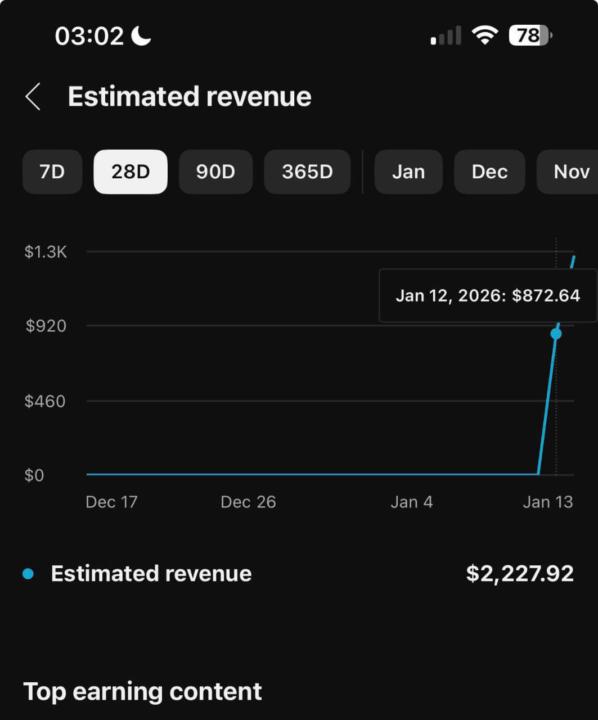
$2,227 in 28 Days with YouTube Automation 🚀💰
From $0 to $2,227 in just 28 days this is how YouTube automation really works. One viral push, smart monetization, and the right audience can change everything overnight. No face, no talking, juststrategy and systems doing the heavy lifting. If you want results like this 👇 Check under the comments and join 👇 our telegram channel OR DM 📥 me directly on WhatsApp
0 likes • Jan 22
Solid results for a sub-30 day window! 📈 Are you leaning more into high-RPM niches like Finance/SaaS to hit those numbers that fast, or is this a high-volume play in a broader entertainment niche? Would love to know if this was driven more by search or the browse features.
Jan 22 •
AI Cold-Calling Voice Agent — Handling Receptionists (Episode 2)
This is Episode 2 of my AI Cold-Calling Voice Agent series. In this demo, the AI agent is trained specifically to handle receptionists and gatekeepers, which is usually where most cold calls fail. The agent: - Stays calm and professional - Avoids sounding salesy - Qualifies the right contact Built using VAPI + AI automation workflows. If you’re building AI agents for sales, outreach, or service businesses, happy to break down how this is set up.
1
0

1-10 of 24