Activity
Mon
Wed
Fri
Sun
Oct
Nov
Dec
Jan
Feb
Mar
Apr
May
Jun
Jul
Aug
Sep
What is this?
Less
More
211 contributions to Growthub Agent OS Academy

14d •
How to Use ChatGPT’s New Image Editing Controls for Winning Ads
In this video, we breakdown the new in-painting and image editing controls in ChatGPT and OpenAI Codex. Learn how to leverage feature tools including Commenting (pixel tagging), Object Removal, and Resizing to rapidly revise AI-generated ad creatives without starting over from scratch. 👀 WHAT I COVER: 👉 The 3 Core In-Image Tools: How to use commenting, brush removal, and aspect ratio resizing directly on generated outputs. 👉 Pixel-Specific Commenting: How tagging exact image locations automatically passes precise coordinate data to the AI for targeted edits. 👉 Batch Conversion Stacking: How to request 3 to 5 rapid variations at once to add high-converting social proof, trust badges, and money-back guarantees. 👉 Selective In-Painting & Erasing: How to draw over unwanted ad elements or visual artifacts to clean up backgrounds instantly. 👉 Codex Evaluator Benchmarks: Setting benchmark criteria for your agents so revisions consistently align with customer pain points. 👉 The Graphic Designer AI Workflow: Generating 10 to 20 base variations and using a human-in-the-loop session to scale winning ad creatives. --- 🔗 RESOURCES & LINKS: 🔹 FREE Strategy Call/Audit: https://book.thegrowthub.com/widget/bookings/growthub-discovery-call-jo 🔹 Join the Growthub Community: https://www.skool.com/growthub/about --- Follow Me: 🔹 Twitter/X: https://x.com/ant0ni0_r0mer0 🔹 LinkedIn: https://www.linkedin.com/in/antonioromero1/
2
0
Jun 18 •
AI Social Content Agents: How I Hit 100K+ Impressions Weekly in 1 Hour/Week
I built a system of AI content agents that pump out 10–15 high-quality social posts daily — and it only takes me about an hour weekly to manage. In this video I break down the exact workflow. What I cover: → The "save & reverse-engineer" method → The Content Marketing Funnel & 5 Stages of Awareness for posting strategy → Branding images in seconds with the Growthub AI image agent → A Claude skill that analyzes your best posts every 90 days → Wiring the Buffer API to AI to auto-schedule based on what's performing → Agents for comment replies, follow-ups, and outreach at scale Watch the full video 👇 https://youtu.be/6AffOpY4rfU
3
0
May 15 •
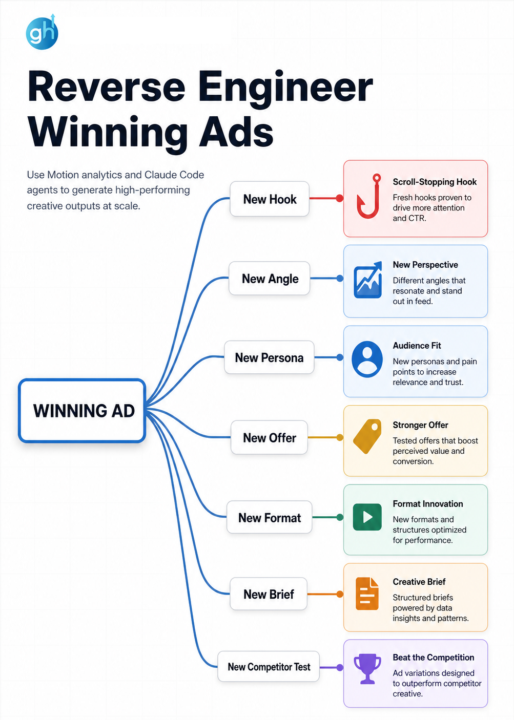
Reverse Enginneer Winning Ads 🔥
We spent 100+ hours analyzing 5,000+ top-performing ad hooks and uncovered a repeatable science. Most marketers write hooks based on "instinct" and wonder why their hit rate is in the gutter. Never try to re-invent the wheel or make decision based on a pure gut feeling. Use proven signals and frameworks to drive breakthrough results. New AI Tools from Motion (Creative Analytics) have been a game changer for our teams to eliminate guesswork. How they help? What if your AI was trained on the secret common denominator responsible for the top 1% of high-scale creative achieving... They took the characteristics from the best performing ads across industries & created a data-backed grading method for hooks. It’s a powerful filtering mechanism that we use before hand-off to video editors. Want free access? 👇 Comment "AI" & I'll share the link!
0 likes • May 26
@Mateo Castillo heres the link: https://hooks.motionapp.com/
0 likes • May 26
@Pradeep Verma heres the link: https://hooks.motionapp.com/
May 8 •
🔥 How We Use AI Agents to Grade Creative Hooks (Full Workflow)
We spent 100+ hours analyzing 5,000+ top-performing ad hooks and uncovered a repeatable science. Most marketers write hooks based on "instinct" and wonder why their hit rate is in the gutter. Never try to re-invent the wheel or make decision based on a pure gut feeling. Use proven signals and frameworks to drive breakthrough results. New AI Tools from Motion (Creative Analytics) have been a game changer for our teams to eliminate guesswork. How they help? What if your AI was trained on the secret common denominator responsible for the top 1% of high-scale creative achieving... They took the characteristics from the best performing ads across industries & created a data-backed grading method for hooks. It’s a powerful filtering mechanism that we use before hand-off to video editors. Want free access? 👇 Comment "AI" & I'll share the link!
0 likes • May 11
@Krishaan Khanal https://hooks.motionapp.com/
Apr 25 •
🤖 GTM Agent Swarms: How to get 100x leverage with local agents
In this video breakdown, I show you how we are deploying GTM Agent Swarms through the Growthub OS to achieve 100x leverage. We aren't just using single AI chatbots; we are deploying coordinated, localized agent environments that work in parallel to execute entire campaign architectures in hours, not months. Get access to the open source repo here 👇 👉 Github: https://github.com/Growthub-ai/growth...
2
0
1-10 of 211

Active 23h ago
Joined Apr 5, 2024
Powered by