Activity
Mon
Wed
Fri
Sun
Nov
Dec
Jan
Feb
Mar
Apr
May
Jun
Jul
Aug
Sep
Oct
What is this?
Less
More
Owned by Marco
Everything Skool forgot
Neue Welt, neue Tools. KI Coding und KI Automatisierung - Endlich kann jeder seine Ideen zum Leben erwecken 🚀
214 contributions to Skool Extensions 🧩

🔥
7h •
Members Near You
𝗠𝗲𝗺𝗯𝗲𝗿𝘀 𝗡𝗲𝗮𝗿 𝗬𝗼𝘂 — 𝗦𝗲𝗲 𝗪𝗵𝗼 𝗟𝗶𝘃𝗲𝘀 𝗔𝗿𝗼𝘂𝗻𝗱 𝘁𝗵𝗲 𝗖𝗼𝗿𝗻𝗲𝗿 Skool tells you how many members a community has, but not who among them lives near you. Members Near You adds a tile below the community card on every community page: the members whose profile location is close to yours, sorted by distance — "Köln · 357 km". Members from a neighbouring country show up too when they live within 300 km, with the country next to the city: "Copenhagen, Denmark · 289 km". Each row shows avatar, name with the usual member badges, place and distance, plus when the member was last active; a click opens the profile in a new tab with this community already selected, so the feed stays where you left it and a DM or a follow is one step away. The tile reads the location each member typed into their Skool profile — the same field Skool shows on the members page — and nothing else. Distances are worked out on your device from a built-in city list, measured between city centres; no map service ever sees a location. Members in a small town the list doesn't know still appear for your country, below the measured ones and without a km value. Members without a location simply don't appear, and if your own profile has none, the tile asks you to add it and links to your settings. Up to five members show in the tile; "Show all" expands it to the full list. If you run the community and keep its member list in the Members Panel, the tile uses that complete list right away. Everyone else sees what Skool shows a regular member: a snapshot of 30 members, the ones online right now first. The tile keeps everyone it has seen and looks again every few hours while you visit, so the list grows from visit to visit. As long as it knows fewer members than the community has, a footnote says so — "Based on 30 of 313 members". Locations rarely change, so members stay in the list for two months after they were last seen. Members Near You is on by default and can be toggled in the Extension Settings, right below Community Stats.

🔥
0 likes • 4h
@Betsy Moll Ah, good point. Sure, goes into the next update.
🔥
Mar 22 •
Discovery 2.0
𝗗𝗶𝘀𝗰𝗼𝘃𝗲𝗿𝘆 𝟮.𝟬 — 𝗦𝗸𝗼𝗼𝗹'𝘀 𝗗𝗶𝘀𝗰𝗼𝘃𝗲𝗿𝘆 𝗣𝗮𝗴𝗲, 𝗨𝗽𝗴𝗿𝗮𝗱𝗲𝗱 Skool's Discovery page shows a name, a cover, a member count and a price — not enough to tell whether a community is alive, who runs it or whether it fits you. Discovery 2.0 turns it into a real research tool: more data on every card, more filters, endless scrolling and a position counter, all switched on with a single setting. Every card gets an extra stat row. Skool's own page data appears instantly: the yearly price when it differs from the monthly one, one-time payments and whether the community is public. In the background the Extension adds what Skool doesn't show at all — posts per day, number of courses, trial availability, affiliate commission and the owner's name with a direct link to their profile. Everything blends into Skool's card layout and follows dark and light mode. Skool's filter panel stops at price, type, sort and language. Below a divider marked with 🧩, Discovery 2.0 adds sliders for members (from–to), rating, price per month, posts per day, members per day, courses, affiliate commission (0–50 %) and founding year (from–to), plus a checkbox for communities with an owner flame. Cards that don't match disappear right away. If fewer than 30 communities remain, the Extension quietly loads more pages — up to ten — until the list is long enough again, and a bar above the grid shows how many communities match, with a reset button next to it. Your filters stay set while you switch category, language or page. The page also scrolls endlessly: near the bottom the next page is appended, no more paging buttons. Hovering a card shows its position in Skool's list as a small number in the corner of the cover — handy if you want to know where your own community ranks. Discovery 2.0 also brings AI Community Search (Premium). Skool's search only matches words in community names; the AI search understands what you mean. Describe what you're looking for in your own words — "photography as a side income, German-speaking" — and get the communities whose descriptions fit best, even when they use different words or another language. Among similarly good matches, active communities come first. "Matches for me" skips the typing and suggests communities similar to the ones you're already in. The results are regular cards with the same stats, Skool's language filter and the free filters apply too, and communities you already belong to never show up. Searches count toward your monthly AI allowance, "Matches for me" doesn't. The "AI search" button in Skool's filter panel shows or hides the search bar.

🔥
0 likes • 6h
@Ayush Pandey Probably not all of them, but a large part. Many small test communities are hidden without any links.
🔥
1 like • 6h
@Ayush Pandey Half free - half premium
🔥
6d •
Cross Post (Premium Feature 👑)
𝗣𝗼𝘀𝘁 𝗶𝗻 𝗔𝗻𝗼𝘁𝗵𝗲𝗿 𝗖𝗼𝗺𝗺𝘂𝗻𝗶𝘁𝘆 — 𝗦𝗵𝗮𝗿𝗲 𝗢𝗻𝗲 𝗣𝗼𝘀𝘁 𝗔𝗰𝗿𝗼𝘀𝘀 𝗬𝗼𝘂𝗿 𝗖𝗼𝗺𝗺𝘂𝗻𝗶𝘁𝗶𝗲𝘀 Running several communities often means posting the same announcement more than once — copy the title, copy the text, download and re-upload every image. Post in Another Community does that for you: when you open one of your own posts, its header gets a button next to the bookmark and bell. Click it and tick one or more of the other communities you belong to. Each one gets its own category select; where a community uses categories, its first category is preselected and you can change it. The extension copies the title, the text, images, GIFs and files, plus a linked video such as YouTube or Loom. Every attachment is uploaded fresh into each target community. Videos you uploaded to Skool stay behind, because Skool ties them to the original community, and polls are not copied either — the window says so before you post. The posts go out one after another with a progress count, and at the end every community shows "Open post" or "Failed". Use it with care. The same post showing up in several communities at once can look like spam — to members who are in more than one of them and to Skool itself. Many communities also have rules against cross-posting or self-promotion. Share a post only where it really fits: ideally in communities you run yourself, or where the rules clearly allow it. If a community needs a different angle, open the copy via "Open post" and adapt it. Post in Another Community is a Premium feature, on by default, and can be switched off in the Posts section of the Extension Settings. ――――――――――――――― 𝗜𝗻 𝗮𝗻𝗱𝗲𝗿𝗲𝗿 𝗖𝗼𝗺𝗺𝘂𝗻𝗶𝘁𝘆 𝗽𝗼𝘀𝘁𝗲𝗻 — 𝗘𝗶𝗻𝗲𝗻 𝗣𝗼𝘀𝘁 𝗶𝗻 𝗺𝗲𝗵𝗿𝗲𝗿𝗲𝗻 𝗱𝗲𝗶𝗻𝗲𝗿 𝗖𝗼𝗺𝗺𝘂𝗻𝗶𝘁𝗶𝗲𝘀 𝘁𝗲𝗶𝗹𝗲𝗻 Wer mehrere Communities betreibt, postet dieselbe Ankündigung oft mehrmals — Titel kopieren, Text kopieren, jedes Bild herunterladen und wieder hochladen. „In anderer Community posten" nimmt dir das ab: Öffnest du einen deiner eigenen Posts, bekommt seine Kopfzeile einen Button neben Lesezeichen und Glocke. Ein Klick, dann eine oder mehrere der anderen Communities ankreuzen, in denen du Mitglied bist. Jede bekommt ihre eigene Kategorie-Auswahl; nutzt eine Community Kategorien, ist die erste vorausgewählt und lässt sich ändern.

🔥
1 like • 1d
@Ettjen Jansingh Is now also possible with the new update. Great idea.
🔥
0 likes • 1d
@Ettjen Jansingh Well then, go for it 😉
🔥
Apr 14 •
Calendar Subscribe
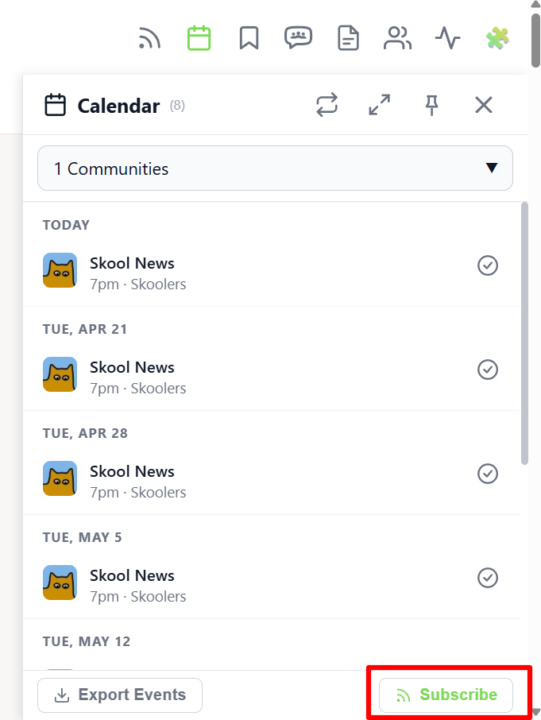
𝗖𝗮𝗹𝗲𝗻𝗱𝗮𝗿 𝗦𝘂𝗯𝘀𝗰𝗿𝗶𝗯𝗲 — 𝗦𝗸𝗼𝗼𝗹 𝗘𝘃𝗲𝗻𝘁𝘀 𝗶𝗻 𝗬𝗼𝘂𝗿 𝗣𝗲𝗿𝘀𝗼𝗻𝗮𝗹 𝗖𝗮𝗹𝗲𝗻𝗱𝗮𝗿 You already have Google Calendar, Apple Calendar or Outlook open all day — so why check a separate sidebar to know when the next Skool event starts? With Calendar Subscribe you get a personal iCal feed URL that pulls every event from every Skool community you're part of directly into the calendar app you already use. Open the Calendar Sidebar and click the Subscribe button in the header. A dialog shows your private iCal URL together with one-click instructions for Google Calendar, Apple Calendar, Outlook (Desktop) and Outlook.com — copy the link, paste it into your calendar app's "Add by URL" / "Subscribe" dialog, and you're done. Your external calendar refreshes the feed automatically, so newly created Skool events appear without you lifting a finger. The feed is personal to your account and covers every community you've joined — no per-community setup, no manual exports, no missed live calls. Whenever you leave or join a community, the feed updates on the next sync. Combined with the Attend button and the per-event Add-to-Calendar menu, Calendar Subscribe turns Skool into a first-class part of your everyday scheduling workflow. --- 𝗞𝗮𝗹𝗲𝗻𝗱𝗲𝗿-𝗔𝗯𝗼 — 𝗦𝗸𝗼𝗼𝗹-𝗘𝘃𝗲𝗻𝘁𝘀 𝗶𝗻 𝗱𝗲𝗶𝗻𝗲𝗺 𝗽𝗲𝗿𝘀ö𝗻𝗹𝗶𝗰𝗵𝗲𝗻 𝗞𝗮𝗹𝗲𝗻𝗱𝗲𝗿 Du hast Google Kalender, Apple Kalender oder Outlook sowieso den ganzen Tag offen — warum also extra in eine separate Sidebar schauen, um zu wissen, wann das nächste Skool-Event startet? Mit dem Kalender-Abo bekommst du eine persönliche iCal-Feed-URL, die jedes Event aus jeder deiner Skool-Communities direkt in die Kalender-App zieht, die du ohnehin nutzt. Öffne die Kalender-Sidebar und klick auf den Abo-Button im Header. Ein Dialog zeigt deine private iCal-URL zusammen mit Klick-für-Klick-Anleitungen für Google Kalender, Apple Kalender, Outlook (Desktop) und Outlook.com — Link kopieren, im "Per URL hinzufügen" / "Abonnieren"-Dialog deiner Kalender-App einfügen, fertig. Dein externer Kalender aktualisiert den Feed automatisch, sodass neu erstellte Skool-Events ohne dein Zutun erscheinen.
🔥
0 likes • 2d
@Andrew Pfeiffer Will be fixed directly with the next update. Thanks for the info.
🔥
1 like • 1d
@Andrew Pfeiffer With the new update this should now work normally again.
🔥
Mar 15 •
🆕 Release Notes
Check here for all the latest news on the upcoming update. Hit the bell 🔔 icon to receive a Skool notification whenever a new update is released. --- Hier findest du alle Neuigkeiten zum kommenden Update. Klick auf die Glocke 🔔, um eine Skool-Benachrichtigung zu erhalten, sobald ein neues Update veröffentlicht wird.
🔥
2 likes • 6d
𝗥𝗲𝗹𝗲𝗮𝘀𝗲 𝗡𝗼𝘁𝗲𝘀 𝘃𝟭.𝟵.𝟭 🔭 𝗗𝗶𝘀𝗰𝗼𝘃𝗲𝗿𝘆 𝟮.𝟬 - Find the right community faster - "Discovery 2.0" upgrades Skool's Discovery page — extra stats on every card, more filters, endless scrolling and a position counter, on by default - "More filters" right in Skool's filter panel — sliders for members, rating, price per month and founding year - Premium adds analysis filters — members per day, posts per day, courses, affiliate program and owner flame - The list scrolls endlessly — if too few communities match, more pages load on their own, and hovering a card shows its position - "AI Community Search" (Premium) — describe what you're looking for in your own words, or let "Matches for me" suggest communities like yours 📤 𝗣𝗼𝘀𝘁𝘀 & 𝗠𝘆𝗦𝗸𝗼𝗼𝗹 - Share further, find faster - New button in the header of your own posts: "Post in another community" — title, text, images and files, one category per community (Premium) - Video download moved from the 3-dot menu to a button at the top of the post, next to bookmark and bell - MySkool scrolls endlessly too — older posts from all selected communities arrive in the right order - New search fields in MySkool — posts by title, text, author or community, events in the calendar, courses in the classroom - "Read post and all comments aloud" with every author named — a click pauses, the next one continues where you left off 👥 𝗠𝗲𝗺𝗯𝗲𝗿𝘀 (𝗣𝗿𝗲𝗺𝗶𝘂𝗺) - Tag faster, see changes right away - "Tag poll voters" — hover an answer in a poll and tag everyone who picked it in one click - Paying members split into "Monthly payers", "Annual payers" and "One-time payers" — as folders and as filters - Tier changes and new paying members show up in the members list right away 📱 𝗦𝗸𝗼𝗼𝗹 𝗪𝗲𝗯𝗔𝗽𝗽 (𝗣𝗿𝗲𝗺𝗶𝘂𝗺) - Now for Premium too - The web app is now unlocked for Premium customers as well, not just VIP - "Skool app for your phone" under Integration in the settings — scan the QR code and you're signed in 🔧 𝗙𝗶𝘅𝗲𝘀 & 𝗣𝗼𝗹𝗶𝘀𝗵 - Creating or duplicating events sets time and duration correctly even on a translated Skool — all half-hour durations up to 24 h
🔥
2 likes • 2d
𝗥𝗲𝗹𝗲𝗮𝘀𝗲 𝗡𝗼𝘁𝗲𝘀 𝘃𝟭.𝟵.𝟮 📱 𝗖𝗼𝗺𝗺𝘀𝗽𝗮𝗰𝗲 - Skool Extensions on your phone, now for everyone - The web app is now called "Commspace" — your feed, chats and notifications on your phone, nothing to install - Open to every account — free accounts get a 7-day trial on their first sign-in, after that it's part of Premium - "Commspace — Skool on your phone" in the extension shows a QR code — scan it and you're signed in 📍 𝗠𝗲𝗺𝗯𝗲𝗿𝘀 𝗡𝗲𝗮𝗿 𝗬𝗼𝘂 - See who lives close by - New tile below the community card — members whose profile location is near yours, sorted by distance in km, with the usual member badges - Members from your country always show up, members from other countries within 300 km - Distances are worked out inside the extension — no location service involved - No location in your Skool profile yet? The tile shows an "Edit profile" link - As a regular member the list grows with every visit — the footnote shows how many members it's based on 🏡 𝗙𝗼𝗿 𝗬𝗼𝘂𝗿 𝗖𝗼𝗺𝗺𝘂𝗻𝗶𝘁𝘆 (𝗩𝗜𝗣) - Unlock more for your members - New settings section "For your community" — everything you unlock for your members in one place, plus a button to copy the extension link - "Community background" — share your own background with every member who uses the extension - "Games for members" — unlock Snake, football and the daily puzzle in the post and comment window of your community - "Reach of your unlocks" shows per community how many members use the extension - Members choose under "Community backgrounds" whether the owner's background shows — and can turn it off per community 📤 𝗖𝗿𝗼𝘀𝘀 𝗣𝗼𝘀𝘁 & 𝗘𝘃𝗲𝗻𝘁𝘀 - Edit before posting, longer event texts - "Post in another community" is now called "Cross Post" (Premium) - New "Continue" step — edit title, text and attachments before the post goes out - The post window's tool row, emoji, templates and GIFs included — your changes stay when you go back - Events save with titles over 30 and descriptions over 300 characters — the description field grows with the text 🎥 𝗟𝗶𝘃𝗲 𝗖𝗮𝗹𝗹 𝟮.𝟬 — 𝗥𝗲𝘄𝗼𝗿𝗸𝗲𝗱 - Everything for live calls under one switch
1-10 of 214

Active 3h ago
Joined Mar 12, 2025
ISTJ
Berlin
Powered by