Activity
Mon
Wed
Fri
Sun
Nov
Dec
Jan
Feb
Mar
Apr
May
Jun
Jul
Aug
Sep
Oct
What is this?
Less
More
Owned by Marco
Everything Skool forgot
Neue Welt, neue Tools. KI Coding und KI Automatisierung - Endlich kann jeder seine Ideen zum Leben erwecken 🚀
210 contributions to Skool Extensions 🧩

🔥
Apr 13 •
Skool Extensions Chatbot
𝗦𝗸𝗼𝗼𝗹 𝗘𝘅𝘁𝗲𝗻𝘀𝗶𝗼𝗻𝘀 𝗖𝗵𝗮𝘁𝗯𝗼𝘁 — 𝗬𝗼𝘂𝗿 𝗜𝗻-𝗔𝗽𝗽 𝗛𝗲𝗹𝗽 𝗔𝘀𝘀𝗶𝘀𝘁𝗮𝗻𝘁 The Skool Extensions Chatbot is a built-in help assistant for the extension itself. It answers questions about the Skool Extensions toolkit: how features work, where to find settings, troubleshooting, release notes, and anything else related to the extension. Open it from the toolkit settings panel or the extension popup and ask in plain language: "How do I enable the focus mode?", "Why don't I see the members panel?", "What's new in the latest release?". The chatbot pulls from the current feature documentation and release notes, so its answers stay in sync with the version you have installed. The chatbot supports English and German, preserves your conversation history locally, and works offline-aware — if the backend is unreachable, you get a clear error instead of a silent failure. No community context or personal data is sent to the backend; only your question and the extension version. --- 𝗦𝗸𝗼𝗼𝗹 𝗘𝘅𝘁𝗲𝗻𝘀𝗶𝗼𝗻𝘀 𝗖𝗵𝗮𝘁𝗯𝗼𝘁 — 𝗗𝗲𝗶𝗻 𝗶𝗻𝘁𝗲𝗴𝗿𝗶𝗲𝗿𝘁𝗲𝗿 𝗛𝗶𝗹𝗳𝗲-𝗔𝘀𝘀𝗶𝘀𝘁𝗲𝗻𝘁 Der Skool Extensions Chatbot ist ein eingebauter Hilfe-Assistent für die Extension selbst. Er beantwortet Fragen rund um das Skool Extensions Toolkit: wie Features funktionieren, wo du Einstellungen findest, Troubleshooting, Release Notes und alles andere rund um die Extension. Öffne ihn über das Toolkit-Einstellungen-Panel oder das Extension-Popup und stelle deine Frage in natürlicher Sprache: „Wie aktiviere ich den Focus Mode?", „Warum sehe ich das Members Panel nicht?", „Was ist neu in der aktuellen Version?". Der Chatbot greift auf die aktuelle Feature-Dokumentation und die Release Notes zu, sodass seine Antworten immer zur installierten Version passen. Der Chatbot unterstützt Deutsch und Englisch, speichert deinen Gesprächsverlauf lokal und ist fehlerresistent — wenn das Backend nicht erreichbar ist, bekommst du eine klare Fehlermeldung statt eines stillen Abbruchs. Es werden weder Community-Kontext noch persönliche Daten an das Backend übertragen, nur deine Frage und die Extension-Version.

🔥
1 like • 2d
@Kimberly Armatys The chatbot is firmly anchored in this community. It is certainly possible for owners to set up a chatbot for their own community. It's especially exciting when many of your own members have already installed the extension.
🔥
1 like • 2d
@Kristine Alise
🔥
Mar 15 •
🆕 Release Notes
Check here for all the latest news on the upcoming update. Hit the bell 🔔 icon to receive a Skool notification whenever a new update is released. --- Hier findest du alle Neuigkeiten zum kommenden Update. Klick auf die Glocke 🔔, um eine Skool-Benachrichtigung zu erhalten, sobald ein neues Update veröffentlicht wird.
🔥
2 likes • 10d
𝗥𝗲𝗹𝗲𝗮𝘀𝗲 𝗡𝗼𝘁𝗲𝘀 𝘃𝟭.𝟴.𝟱 ✍️ 𝗧𝗿𝗮𝗻𝘀𝗹𝗮𝘁𝗶𝗼𝗻 & 𝗦𝗽𝗲𝗹𝗹 𝗖𝗵𝗲𝗰𝗸 - Check your text before you send it - New language button in the post and comment window — check your draft's spelling or, in translated communities, translate it - Mistakes show up with suggestions to click or ignore — "Apply clear fixes" takes every unambiguous one at once - DMs, Group Chat and Skool's own DM chat get the same button — hover it to switch between translate and check - Switch it on under "Translation & spell check" — separately for posts and for chats - Translation and spell check ask for your consent once — until then you see the original text 📊 𝗣𝗼𝗹𝗹𝘀 𝗶𝗻 𝗚𝗿𝗼𝘂𝗽 𝗖𝗵𝗮𝘁 - Ask the group, see the votes - New button "Create poll" at the chat window — a question, 2 to 12 options, multiple answers if you like - Members vote right in the message — bars and vote counts show where the group stands - Hover an option to see who voted for it - Chat list and notifications show the poll with 📊 and its question 🏷️ 𝗘𝘅𝘁𝗲𝗻𝘀𝗶𝗼𝗻 𝗕𝗮𝗱𝗴𝗲 - See who else uses Skool Extensions - "Show your extension badge" — other Skool Extensions users see a small logo next to your name - The logo appears in the feed, in chats and on profile cards - Hover the logo next to someone else's name and click to show your own - Change your choice any time under "Data processing" — after revoking, the logo disappears within 7 days 🔧 𝗙𝗶𝘅𝗲𝘀 & 𝗣𝗼𝗹𝗶𝘀𝗵 - "Download video" saves embedded Vimeo and Wistia videos and works in the MySkool post view — clear messages if a video can't be saved (Premium) - Several images in one chat message show as a slideshow — a click opens the gallery - Schedule and Draft share one button in the post window — with both switched on, a click lets you pick - Cloud Sync no longer switches itself off when you change another setting — where that happened, it's back on - Live calls: video tiles no longer disappear after a screen share ends --- 𝗥𝗲𝗹𝗲𝗮𝘀𝗲 𝗡𝗼𝘁𝗲𝘀 𝘃𝟭.𝟴.𝟱 ✍️ Ü𝗯𝗲𝗿𝘀𝗲𝘁𝘇𝘂𝗻𝗴 & 𝗥𝗲𝗰𝗵𝘁𝘀𝗰𝗵𝗿𝗲𝗶𝗯𝗽𝗿ü𝗳𝘂𝗻𝗴 - Text prüfen, bevor er rausgeht
🔥
1 like • 3d
𝗥𝗲𝗹𝗲𝗮𝘀𝗲 𝗡𝗼𝘁𝗲𝘀 𝘃𝟭.𝟴.𝟲 ✍️ 𝗧𝗿𝗮𝗻𝘀𝗹𝗮𝘁𝗶𝗼𝗻 & 𝗦𝗽𝗲𝗹𝗹 𝗖𝗵𝗲𝗰𝗸 — 𝗥𝗲𝘄𝗼𝗿𝗸𝗲𝗱 - Any community, any language - "Translate" in the post window now works in every community — in your own language it switches between English and German - Hover "Translate" to pick from 28 languages — your choice is remembered per community and preselected next time - Spell check shows the language it detected — click it to pick another and check again - In chats, hovering the translate button opens the language list — your pick sticks for that chat - New "Undo | Redo" row in the language menu — takes back translations and fixes too 📣 𝗠𝗲𝗻𝘁𝗶𝗼𝗻 𝗔𝗹𝗹 𝗖𝗼𝗺𝗺𝗲𝗻𝘁𝗲𝗿𝘀 (𝗣𝗿𝗲𝗺𝗶𝘂𝗺) - Reply to the whole thread at once - New "All commenters" entry in the @ menu of the comment window — one pick mentions everyone who commented, replies included - Works in every community you can comment in and in the comment window of MySkool - Everyone appears once and you never mention yourself — more than 50 mentions ask for confirmation first - Switch it on or off with "Mention all commenters" in the Posts section of the settings 🤖 𝗠𝗖𝗣 & 𝗥𝗘𝗦𝗧 𝗔𝗣𝗜 (𝗩𝗜𝗣) - More you can do from your AI chat - "Community MCP for members" — let members connect the Skool Extensions MCP to their AI chat without a plan of their own - New admin tools — approve, reject, remove or ban members and handle membership requests - Change pricing, rules, links, community settings and module access with drip from your AI chat - Start Video AI for a lesson and apply its result via MCP or REST API 👥 𝗠𝗲𝗺𝗯𝗲𝗿𝘀 & 𝗖𝗥𝗠 - Fewer clicks, bigger lists - "Profile menu on hover" — switch it off and the profile menu only opens via ⋯ or a right-click - "Take over tag" — tags credited to another admin become yours, shown to all team admins - Tags with an emoji show it in filters and the tag popup instead of a color dot - The chat button in the CRM profile opens the conversation right next to the profile - Members panel and CRM load up to 5,000 members instead of 1,000 — large communities are complete
🔥
Mar 13 •
Focus Mode
𝗙𝗼𝗰𝘂𝘀 𝗠𝗼𝗱𝗲 — 𝗛𝗶𝗱𝗲 𝗡𝗼𝘁𝗶𝗳𝗶𝗰𝗮𝘁𝗶𝗼𝗻 𝗕𝗮𝗱𝗴𝗲𝘀 Notifications can be a real productivity killer. Every time you see that little red badge, your brain wants to check it. Focus Mode solves this by hiding all notification badges from your Skool navbar. Click the eye icon in your navbar and all notification counters disappear instantly. No more red dots pulling your attention away from what you're actually doing — whether that's writing a post, going through a course, or engaging in a discussion. Click the icon again to bring the badges back whenever you're ready. Focus Mode also suppresses browser notifications while active, so you get a truly distraction-free experience. When you're done with deep work, just toggle it off and catch up on everything you missed. --- 𝗙𝗼𝗰𝘂𝘀 𝗠𝗼𝗱𝗲 — 𝗕𝗲𝗻𝗮𝗰𝗵𝗿𝗶𝗰𝗵𝘁𝗶𝗴𝘂𝗻𝗴𝘀-𝗕𝗮𝗱𝗴𝗲𝘀 𝗮𝘂𝘀𝗯𝗹𝗲𝗻𝗱𝗲𝗻 Benachrichtigungen können echte Produktivitätskiller sein. Jedes Mal, wenn du dieses kleine rote Badge siehst, will dein Gehirn nachschauen. Focus Mode löst das, indem alle Benachrichtigungs-Badges aus deiner Skool-Navbar ausgeblendet werden. Klick auf das Augen-Icon in deiner Navbar und alle Benachrichtigungs-Zähler verschwinden sofort. Keine roten Punkte mehr, die deine Aufmerksamkeit von dem ablenken, was du gerade tust — egal ob du einen Post schreibst, einen Kurs durcharbeitest oder an einer Diskussion teilnimmst. Klick einfach erneut auf das Icon, um die Badges wieder einzublenden, wenn du bereit bist. Focus Mode unterdrückt auch Browser-Benachrichtigungen, solange er aktiv ist — für ein wirklich ablenkungsfreies Erlebnis. Wenn du mit deiner Deep-Work-Phase fertig bist, schalte ihn einfach aus und hole alles nach.
🔥
2 likes • 6d
@Adam McCollough 🥳
🔥
2 likes • 3d
@Ettjen Jansingh Yes, you can also click on the Chrome button. You can also install Chrome Extensions in Brave.
🔥
Mar 13 •
Calendar
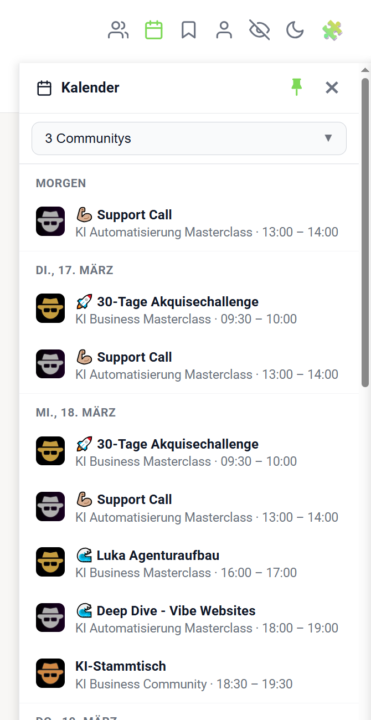
𝗖𝗮𝗹𝗲𝗻𝗱𝗮𝗿 — 𝗔𝗹𝗹 𝗬𝗼𝘂𝗿 𝗖𝗼𝗺𝗺𝘂𝗻𝗶𝘁𝘆 𝗘𝘃𝗲𝗻𝘁𝘀 𝗶𝗻 𝗢𝗻𝗲 𝗣𝗹𝗮𝗰𝗲 Juggling multiple Skool communities and losing track of upcoming events? The Calendar sidebar pulls all your events into a single, chronological view — no more hopping between communities to see what's coming up. Click the calendar icon in your navbar to open the sidebar. Pick which communities you want to see events from (individually or all at once), and the sidebar remembers your selection for next time. Events are sorted by date with clear labels like "Today", "Tomorrow", and specific dates, each showing the title, community logo, and time range. Use the built-in search to quickly find a community in the selector, and pin the sidebar so it stays open while you browse. Right-click any event (or use the Add-to-Calendar menu) to add it directly to Google Calendar, Apple Calendar, Outlook, Outlook.com, or Yahoo. Hit the Attend button to mark yourself as attending in one click, or use the Subscribe button to get a personal iCal URL — your Skool events stay in sync with your external calendar automatically. For speed, all events are cached for 24 hours and persist across page reloads, so the sidebar opens instantly. A manual sync button is right there in the header whenever you want fresh data, and your favorite communities are used as the default filter so the events you care about appear first. The Calendar comes with two tightly integrated sub-features: 𝗖𝗮𝗹𝗲𝗻𝗱𝗮𝗿 𝗦𝘂𝗯𝘀𝗰𝗿𝗶𝗯𝗲 — A personal iCal feed URL that pipes every Skool event from every community you've joined directly into Google Calendar, Apple Calendar or Outlook. One-click setup, automatic background sync, no manual exports. 𝗔𝘁𝘁𝗲𝗻𝗱 𝗕𝘂𝘁𝘁𝗼𝗻 — Mark yourself as attending any event with a single click, right from the sidebar or the native Skool calendar. Your RSVP is sent straight to Skool's API and reflected everywhere instantly. --- 𝗞𝗮𝗹𝗲𝗻𝗱𝗲𝗿 — 𝗔𝗹𝗹𝗲 𝗖𝗼𝗺𝗺𝘂𝗻𝗶𝘁𝘆-𝗘𝘃𝗲𝗻𝘁𝘀 𝗮𝗻 𝗲𝗶𝗻𝗲𝗺 𝗢𝗿𝘁 Mehrere Skool-Communities und den Überblick über anstehende Events verloren? Die Kalender-Sidebar bündelt alle deine Events in einer einzigen, chronologischen Ansicht — kein Hin- und Herwechseln mehr zwischen Communities, um zu sehen, was ansteht.
🔥
1 like • 9d
@Sergio Recatero Rude You can get the calendar subscription in the global calendar. You will receive an individual link for all appointments in your set communities. Is a premium function.
🔥
1 like • 7d
@Sergio Recatero Rude For this function you would first have to book premium.
🔥
Jun 25 •
Skool API + Skool MCP (VIP Feature 💎)
𝗦𝗸𝗼𝗼𝗹 𝗥𝗘𝗦𝗧 𝗔𝗣𝗜 — 𝗗𝗿𝗶𝘃𝗲 𝗬𝗼𝘂𝗿 𝗖𝗼𝗺𝗺𝘂𝗻𝗶𝘁𝘆 𝗙𝗿𝗼𝗺 𝗬𝗼𝘂𝗿 𝗢𝘄𝗻 𝗧𝗼𝗼𝗹𝘀 Everything you do by hand inside Skool — read posts, manage members, create events, pull the leaderboard — your own scripts and automations can now do too. The Skool REST API exposes your community data over plain HTTP, so n8n, Postman, a cron job or any tool that speaks REST can read and write to Skool without a person clicking through the UI. A new "Integration" section in Settings is where it lives. Flip one toggle and the API arms for your account; flip it off and every call stops answering at once — there's no half-on state to forget about. A built-in documentation view lists every available endpoint with its parameters, so you can wire up a request and see the shape of the response without leaving Skool or hunting through a separate doc site. The API speaks the same surface the Extension itself uses — posts, comments, members, events, categories, the leaderboard, community info and more — so anything you've watched a panel do, a script can do on a schedule. Premium-gated; the toggle and the docs view both sit in Settings → Integration. 𝗦𝗸𝗼𝗼𝗹 𝗠𝗖𝗣 — 𝗖𝗼𝗻𝗻𝗲𝗰𝘁 𝗮𝗻 𝗔𝗜 𝗔𝘀𝘀𝗶𝘀𝘁𝗮𝗻𝘁 𝗦𝘁𝗿𝗮𝗶𝗴𝗵𝘁 𝘁𝗼 𝗬𝗼𝘂𝗿 𝗖𝗼𝗺𝗺𝘂𝗻𝗶𝘁𝘆 The Model Context Protocol is how AI assistants like claude.ai, ChatGPT and Claude Code plug into outside tools. Skool MCP gives them a door into your community: connect the new MCP server once and an assistant can read and manage your Skool data in plain conversation — "summarize this week's posts", "tag every member who joined in March", "create an event for Friday" — without you scripting a single call. Setup lives next to the REST API in Settings → Integration and is built to be copy-paste simple. A guided panel hands you the server URL, lets you create an access key, and walks you through adding it as a custom connector in claude.ai. From there the assistant signs in once and receives its own short-lived token, so your key never has to live inside another app. You manage your own keys from the same panel. Give each key a label so you remember which tool it's for, see when it was last used, and revoke any of them the moment you stop needing it. Each key is shown exactly once at creation and never again — so it stays as private as your password. Premium-gated, and it rides on top of the same REST surface, so anything the API can do, the assistant can do through it.
🔥
3 likes • Jul 15
@Jonas Goldt Yes, definitely. This can be done via the API or the workflows, where such events are triggered and you can send freely configurable requests to your CRM.
🔥
2 likes • 8d
@Nedra Bryant Yes, everything you list is already possible with the Extension MCP. I would also say that this MCP is currently the best and strongest that has been built for the Skool platform to date. I like your idea of connecting Skool with the ClickUp Super Agent 💪🏼
1-10 of 210

Online now
Joined Mar 12, 2025
ISTJ
Berlin
Powered by