Activity
Mon
Wed
Fri
Sun
Nov
Dec
Jan
Feb
Mar
Apr
May
Jun
Jul
Aug
Sep
Oct
What is this?
Less
More
Owned by George
HWC is a supportive peer group to help purpose-driven parents who are, or who want to be, working or running a business or YouTube channel from home.
Bootstrapping Biz
30
Free
Embrace Your Inner Weirdo
126
5.0
Free
Old Me Living
311
5.0
$10/m
The Storytelling Room
444
5.0
$45/m
Skool Made Simple
149
5.0
Free
KDP Publishing
2k
5.0
$59/y
YouTube Green Room
780
Free
Co-Labor Collective
396
Free
Creator Boost Tribe
9.2k
Free
1069 contributions to Creator Boost Tribe

🔥
1d •
OpenAI Is Retiring Custom GPTs!
I am not sure if anyone here is using OpenAI custom GPTs - but I recently came across some news from OpenAI that I thought was worth sharing. According to OpenAI, Custom GPTs are scheduled to be retired on December 11, 2026, as they transition toward a new plugin-based system. The good news is that OpenAI is providing a migration process that will allow creators to move their GPT instructions and knowledge files into plugins. Existing conversations will also remain accessible. Here's the official announcement and FAQ from OpenAI: https://help.openai.com/en/articles/20001519-custom-gpt-retirement-and-migration-faq
🔥
0 likes • 1d
@Debby Garcia - Your Welcome! Good luck with it!
🔥
0 likes • 17h
@Mouldi Nouri - Thanks for the reply - I am sure others will find it helpful.
🔥
Jul 26 •
Google Announced - New! Shorts Thumbnail Feature
YouTube just announced several new features that could be useful for creators, especially those using Shorts or trying to build a stronger community around their channel. One of the biggest updates is that creators in the YouTube Partner Program can now upload fully custom thumbnails for Shorts through YouTube Studio on desktop. Creators can also choose from three suggested thumbnail frames on desktop, while mobile users can still select a specific frame from the Short. YouTube recommends keeping the most important parts of a Shorts thumbnail near the center. Although Shorts are displayed in a 9:16 format, the safest area for text, faces, and other important elements is closer to a 3:2 section in the middle because thumbnails may be cropped differently across YouTube. YouTube is also adding generative thumbnail tools to Ask Studio. These tools can use information from a video transcript and the creator’s existing channel to suggest thumbnail ideas that match the channel’s content, style, and audience. Creators can then refine the text, layout, colors, and overall look through conversational prompts. Other updates mentioned in the video include free one-month channel membership trials for some eligible viewers and channels, along with several improvements to YouTube Communities. These include community-only posts, better moderation tools, easier moderator assignments, fan notifications, and more ways for viewers to discover and participate in creator communities. You can watch the complete YouTube update here: https://www.youtube.com/watch?v=IsoUDk7m3yA
🔥
0 likes • Jul 28
@Amalia Shakti Your Welcome!
🔥
1 like • Jul 28
@Desley Casey - Your Welcome! Glad I could share the news and hope it helps!
🔥
Jun 27 •
Do you know How Skools Leaderboard System Works?
Do you really understand how Skools Leaderboard System works? If not let me explain it. You can see the details directly from Skool by CLICKING HERE. The basics are simple. When members choose to write a post or share a comment on someone elses posts they create an opportunity for others to respond by clicking like. Those likes are tallied and that number becomes the leaderboard ranking. So if you want to rise up in the ranking on the Leaderboard - all you have to do is write posts or share comments that others like. Thats it! Hope this helps!
🔥
3 likes • Jun 30
@Shafna Aura - Great question! I tend to think of it as a way to guage trust. The people that are higher up on the leaderboard tend to be people that others in the community have recognized as providing content and comments that have been helpful. So the more people engage by creating posts and comments, and the more others find that engagement to be helpful, then the more likely the people that find the comments or posts helpful will put a like on one of those posts or comments. I hope I worded that in a way that makes sense?
🔥
1 like • Jul 5
@Andy Asher - I know that the question you ask -"Is there a better way?" is at the heart of a recent debate that I and others have had in a seperate community. If you have any thoughts to share about what that better way would look like I would love to here them!

May 22 •
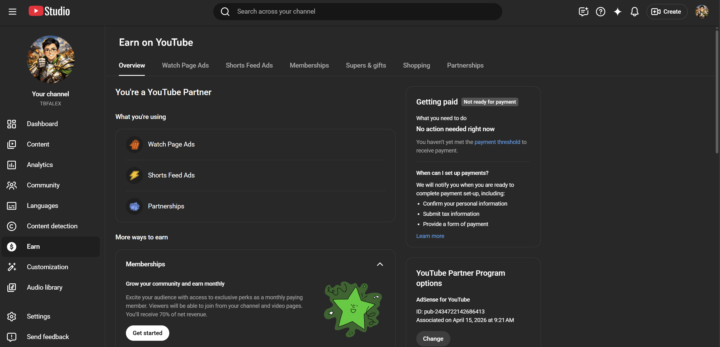
“Just Got Monetized — Need Help Setting It Up!”
Hi everyone, After six months of consistent grinding and uploading, my channel is finally monetized! 🎉 However, I’ve noticed the setup process feels a bit confusing. When I check my dashboard, it still shows that I’m not ready for payment and that I haven’t yet met the payment threshold. From what I understand, it seems I just need to wait until YouTube sends an email confirming that I’m ready to complete the payment setup. That message on the side says: “No action needed right now — you haven’t yet met the payment threshold to receive payment.” Once that happens, I’ll be able to confirm my personal information, submit tax details, and provide a payment method. Thanks in advance for any insights — I didn’t expect this next step to be so tricky, lol. Always appreciate the help from the community!
🔥
2 likes • May 24
Congratulations
🔥
1 like • May 25
@Alex Vo Your Welcome!

Apr 11 •
Teleprompter
I have an 18 inch (ILOKNZI)? Teleprompter and have never used it, because it's too complicated to set up. Up until now, I memorize my entire script - I know, crazy!!! But I am a pianist and had to memorize hours of music. So memorizing stuff is not foreign to me - however, things would move along a lot faster, it I could just "read" the script. Are there teleprompters that are easy to use and set up? Mine has a fragile glass mirror that reflects the words from the iPad, meaning I have to type the script into the iPad and do all kinds of tricks to make this work. By that time I have my script memorized. Any suggestions on an easy to use teleprompter and how to set it up that the viewer can't see that I am reading....Thanks in advance.
🔥
2 likes • Apr 12
Here's a photo that might help. Just picture the qpromt software running on the monitor behind the camera. And the pink tape on the right side of the screen has a black mark on (faint in the photo) that represents the area that I put the qprompt software viewport arrows at. That tells me where on the screen to be focusing my eyes so that it looks like I am looking at the camera.
🔥
1 like • Apr 30
@Catherine R - I am glad you like it! I know it works well for me and was hoping it would work well for others.
1-10 of 1,069
🔥
@george-benson-1395
Married Entrepreneur for 30 years, "The Home Work Dad" for 20+ years. I help purpose-driven parents who run home based businesses & YouTube Channels.
Active 6h ago
Joined Sep 24, 2024
Maine, United States
Powered by