
Pinned

🍀
Mar 5 •
📌 START HERE — How to Get Your OpenClaw Bot Set Up
Hey Guys! If you are looking to get started with OpenClaw you have come to the right place! Step 1: Join our Free WhatsApp Group for in the moment updates on OpenClaw: WhatsApp Group Step 2: Install OpenClaw! 🆓 Option 1 — Do It Yourself (Free) Most people hit a wall when they get to the terminal. That's normal. The DIY path is real — but it's not for everyone. Plus you have no support when your bot inevitably breaks.... ⚙️ Option 2 — Hosted Subscription ($24.99/month) with one-click free install of your bot and live dashboard! Once your bot is live, this keeps it running and improving. You get: - Server hosting + management (we handle the tech, 24/7) - Automatic Backups of your Server in-case something breaks - Live weekly paid semi-private Q&As with the team - Multi-device setup on any hardware you want - 1-click skill installs - Dashboard Visualization of your Bots Files, Skills, Workflows and Subagents - Spin up multiple agents with the click of a button! - Access to the best AI models at the lowest cost — 10x the tokens for 1/3 the price (coming soon) This is ONLY $24.99/month. It covers our server costs and keeps your bot online without you touching a thing. 🚀 Option 3 — Done With You Install ($297 one-time + $24.99/month) Skip the DIY entirely. A team member jumps on a 1-hour call with you, configures your bot to your exact workflow, and hands it to you live and running. No terminal. No guessing. No wasted weekend.
Pinned
🍀
Feb 28 •
Welcome! JUST TALK TO IT!
3rd Skool Community 😅 Bear with us as we set things up. Announcements coming. For our Beta Testers: Start asking questions as they come up, we'll do our best to answer quickly. For our aspiring users, book some time with us to set up your Bot and kick things off at the incoming link (launching shortly).
Pinned
🍀
Mar 2 •
Within THE FIRST HOUR after Setup....
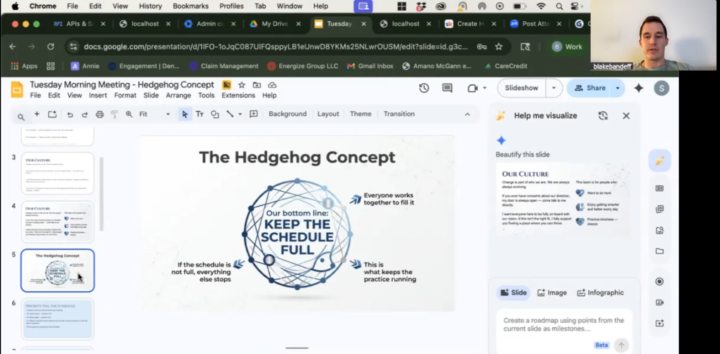
Within THE FIRST HOUR after Setup TODAY....@Blake Bandeff and @Reagan Thomson had already used OpenClaw to create a staff presentation they had been procrastinating on.... Blake opened a voice note and SPOKE to his bot Aria, prompting her with just stream-of-conscious for what he wanted to create and the key points he wanted inside that presentation.... and VOILA! OpenClaw opened a Google Slides deck and created the whole presentation for them in seconds.... You don't have to be a power user to see immediate benefit. OUR NEW SLOGAN THEREFORE IS: JUST TALK TO IT!

9d •
AI assistant builders: what's your Mac mini / Mac Studio setup? Looking for real-world use cases before I buy
@Michael Pansolini Hey all, I'm a real estate GP with a full-time day job and a busy family. I'm building an AI "chief of staff" to handle task follow-ups, deal screening, email drafts and team check-ins, and I'd love to learn from people who've already done it. Where I'm at: - Private vault: Mac Studio M5 Max, 64GB, running local AI for sensitive business documents - Orchestrator: one cloud server running OpenClaw as a "CEO" agent that spins up helpers (builder, QA, ops) on demand - Dev work: Claude Code - Interface: Telegram / Discord - Security: vault fully segregated; servers can never connect into it What I'd love to hear: 1. Hardware: Mac mini vs. Mac Studio? How much RAM? Would you change anything? 2. Local vs. cloud AI: which local models are actually useful? Where do you still use Claude/GPT? 3. Daily use cases: what saves you the most time? 4. Creative or weird uses: one-off automations that surprised you 5. Segregation: how do you isolate your assistant from the rest of your infrastructure? 6. Multi-agent setups: org chart of agents vs. one agent with skills? What worked? 7. Lessons learned: what would you do differently? Easy reply template: Setup (hardware/RAM): Local models I use: Best daily use case: Most creative use: How I isolate it: Biggest lesson: I'll pull everything together into a summary and share it back with the group. Happy to share what I learn as I build too.

11d •
What technical skills do US companies actually need right now?
Been working with software systems for more than 10 years, mostly around backend, cloud, AI, automation, and product development. One thing I’ve learned, knowing a programming language alone usually isn’t enough. The harder part is understanding the actual business. How to automate work that’s still manual. Connect systems that don’t work well together. Build AI into real workflows. Keep the backend stable when usage grows. Deal with data scattered across different tools. These are the kinds of problems I’ve spent a lot of time working on here in Japan. But I’m curious about the US side. For people running companies in the US, what technical skills are becoming difficult to find? And what skills do you think companies will need more of over the next few years?
0
0
1-30 of 60
skool.com/agenticai
OpenClaw One Click Install & Support group! We help you get set up in seconds and demo skills you'll ACTUALLY USE. Plus weekly live learning sessions!
Leaderboard (30-day)
1
+2
Powered by