Activity
Mon
Wed
Fri
Sun
Sep
Oct
Nov
Dec
Jan
Feb
Mar
Apr
May
Jun
Jul
Aug
What is this?
Less
More
Owned by Axel
Dein Spielfeld für Innovation im Kinder- & Jugendfußball. Inspiration, Wissen & Austausch für Coaches, die Kinder mit Herz & Hirn fördern.
7 contributions to Skool Extensions 🧩

🔥
26d •
Background Changer (from level 3)
𝗕𝗮𝗰𝗸𝗴𝗿𝗼𝘂𝗻𝗱 — 𝗥𝗲𝗽𝗹𝗮𝗰𝗲 𝘁𝗵𝗲 𝗦𝗸𝗼𝗼𝗹 𝗽𝗮𝗴𝗲 𝗯𝗮𝗰𝗸𝗴𝗿𝗼𝘂𝗻𝗱 𝘄𝗶𝘁𝗵 𝗮 𝗴𝗿𝗮𝗱𝗶𝗲𝗻𝘁, 𝘆𝗼𝘂𝗿 𝗼𝘄𝗻 𝗶𝗺𝗮𝗴𝗲 𝗼𝗿 𝗮 𝗱𝗮𝗶𝗹𝘆 𝗽𝗵𝗼𝘁𝗼 Skool ships one page background, and it is the same for everyone. The Background feature replaces it with something you pick: thirteen ready-made gradients and mesh blends (Aurora, Sunset, Ocean, Midnight, Candy, Mint and more), a two-colour gradient you mix yourself with a free angle, an image you upload, or a photo that changes every single day. Four daily-photo sources are available: Bing Daily, Windows Spotlight, Wikimedia Picture of the Day and NASA's Astronomy Picture of the Day. Each fetches a fresh image once a day, so the page looks different every morning without you touching a setting. Preview thumbnails load for all sources up front — including the ones you have not selected — so you see the actual picture before choosing. The feature unlocks with your level in the Skool Extensions community. Level 3 opens the Background itself along with all gradients, your own colours and your own image. The daily-photo sources follow: Bing and Spotlight at level 4, Wikimedia and NASA at level 5. Locked tiles stay visible with a grey wash and a level badge — click the badge and you land on the community leaderboard, where you can see your standing and what the next level takes. Two sliders control how the page sits on top of the image. Transparent cards sets how much of the background shows through Skool's cards and panels, and Blurred controls how soft the photo behind them gets. Both update live while you drag, and dark mode keeps its own slightly stronger opacity so the balance between the two modes survives a single slider. On photo backgrounds, readability is handled for you: the text colour is chosen by real WCAG contrast against the image rather than a rough brightness guess, and text sitting directly on the background — native header links, the pin strip footer — gets a fine outline so it stays legible over busy areas. Gradients and mesh blends are left alone; they do not need it.


🔥
11 likes • 26d
Cooles Feature. Danke @Marco Berlin
🔥
3 likes • 26d
@Daniel Spitzwieser Dusk (Dämmerung) sieht cool aus.😁
🔥
May 24 •
500 Members 🥳
We’ve now reached 500 members in the community 🥳 That means almost 80% of all extension users are also joining the community to connect and exchange ideas. That’s amazing. Let’s keep the momentum going, have fun together, and make the extension even more popular. You really do have the chance here to help shape features and improvements for your everyday Skool experience. Many of your ideas have already become reality. Some more advanced ones are still part of the premium membership. Join the first live call for the extension this Thursday. I’ll also showcase a lot of premium features that many of you probably haven’t discovered yet. And brand new: I’ll introduce the Workflow Builder for Skool automations ☝🏼 —- Wir sind jetzt 500 Mitglieder hier in der Community 🥳 Das heißt fast 80% der Extension Nutzer kommen auch in die Community um sich auszutauschen. Das ist genial. Lasst uns hier weiter Gas geben und Spaß haben und die Extension so noch bekannter machen. Ihr habt es hier tatsächlich in der Hand eure individuellen Wünsche für euren Skoolalltag umsetzen zu lassen. Viele davon konnte ich bereits war werden lassen. Einige verstecken sich noch in der Premiummitgliedschaft. Sei am Donnerstag zum ersten Livecall der Extension dabei. Ich stelle auch viele Premiumfunktionen vor, die ihr bestimmt noch nicht kennt. Brandneu zeige ich euch den Workflow Builder für Skool Automatisierungen ☝🏼

🔥
6 likes • May 24
Stolze Leistung. 👍Qualität setzt sich durch.🥇
🔥
May 15 •
🔥 Activity Update
I’m officially launching the 🤣 Fun Section here in the Skool Extensions community 🥳 Let’s have some fun and get things moving. Full activity is the goal. My vision is to push this community into the Top 30 someday. Maximum visibility means the extension spreads everywhere on Skool, allowing even more people to benefit from it. You know the Activity Flame in the top left, right? Usually, clicking it copies your stats to the clipboard. But here in this community, under this post, it’s even easier: just click the puzzle icon in the comments and insert your personal activity stats directly. Let’s see who’s the most active on Skool! 🔥🔥🔥 --- Hiermit starte ich den 🤣 Funbereich in der Skool Extensions Community 🥳 Lasst uns hier richtig Spaß haben und Action machen. Volle Aktivität. Mein Ziel ist es diese Community irgendwann mal unter den top 30 zu bekommen. Maximale Sichtbarkeit, damit sich die Extension wirklich überall auf Skool verbreitet und noch mehr davon profitieren. Du kennst doch die Activity Flame oben links. Bei Klick erhälst du deine Activity Stats in der Zwischenablage. Noch einfach geht es hier in dieser Community unter diesem Post. Klick auf das Puzzleicon im Kommentar und füge direkt deine persönlichen Activity Stats ein. Lasst uns hier mal schauen, wer am aktivsten auf Skool ist 🔥🔥🔥

🔥
1 like • May 16
@Marco Berlin Nicht schlecht. Coole Serie👍
🔥
3 likes • May 16
🔥 Activity Update 📍 Today | 20 / 10 🔥 Streak | 92 days 📈 Last 7 days | 118
🔥
May 5 •
Translate About Pages & Discovery
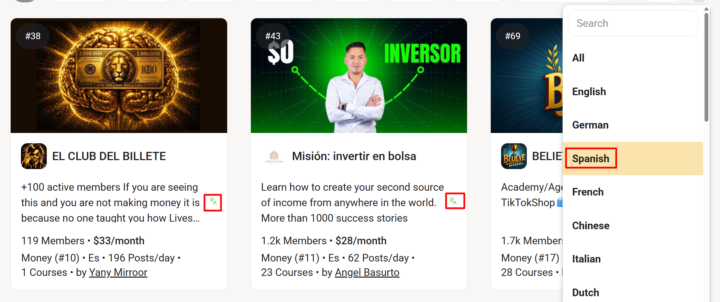
𝗧𝗿𝗮𝗻𝘀𝗹𝗮𝘁𝗲 𝗔𝗯𝗼𝘂𝘁 𝗣𝗮𝗴𝗲𝘀 & 𝗗𝗶𝘀𝗰𝗼𝘃𝗲𝗿𝘆 — 𝗕𝗿𝗼𝘄𝘀𝗲 𝗖𝗼𝗺𝗺𝘂𝗻𝗶𝘁𝗶𝗲𝘀 𝗬𝗼𝘂 𝗗𝗼𝗻'𝘁 𝗦𝗽𝗲𝗮𝗸 𝗬𝗲𝘁 Discovering new Skool communities used to mean scrolling past dozens of cards in languages you don't read. Translate About Pages fixes the discovery problem and the deeper "should I join?" decision in one go: every community's About page and every discovery card description gets translated to your interface language automatically — even before you've joined. The toggle is on by default for every fresh install. Browse the discovery page or open any community's About page, and the description renders in your language right away. Each translated section keeps a small toggle so you can flip back to the original text whenever you want — useful when you want to verify a specific phrase or read in the original tone. Translations are cached on the same hybrid backend as Community Translation, so the second time you (or anyone) sees the same About page or card, the translated text loads instantly with no API round-trip. To avoid the "translating English into English" anti-feature, the toggle ships with a smart language filter: your current UI language and English are automatically excluded by default — so a German user sees German pages untranslated and English pages untranslated, but Spanish, French, Italian and Vietnamese pages all flip to German. The exclusion list lives in Settings → Language and you can add or remove any ISO-2 language code at will (e.g. add "es" if you also speak Spanish and don't need it translated). On first install the exclusion list is initialized to your UI language plus English, so the most common case "just works" without configuration. Same engine, same mention protection, same caching as the rest of the translate stack — and free for all users. --- 𝗔𝗯𝗼𝘂𝘁-𝗦𝗲𝗶𝘁𝗲𝗻 & 𝗗𝗶𝘀𝗰𝗼𝘃𝗲𝗿𝘆 ü𝗯𝗲𝗿𝘀𝗲𝘁𝘇𝗲𝗻 — 𝗖𝗼𝗺𝗺𝘂𝗻𝗶𝘁𝗶𝗲𝘀 𝗲𝗻𝘁𝗱𝗲𝗰𝗸𝗲𝗻, 𝗱𝗶𝗲 𝗱𝘂 𝗻𝗼𝗰𝗵 𝗻𝗶𝗰𝗵𝘁 𝘀𝗽𝗿𝗶𝗰𝗵𝘀𝘁 Neue Skool-Communities entdecken hieß bisher: an Dutzenden Karten in Sprachen vorbeiscrollen, die du nicht lesen kannst. About-Seiten übersetzen löst das Discovery-Problem und die tiefere „Soll ich beitreten?"-Entscheidung in einem Schritt: Jede About-Seite einer Community und jede Beschreibung in der Discovery-Übersicht wird automatisch in deine Oberflächensprache übersetzt — schon bevor du beigetreten bist.
🔥
4 likes • May 5
Vielen Dank. Cooles Feature👍
🔥
May 5 •
Community Translation
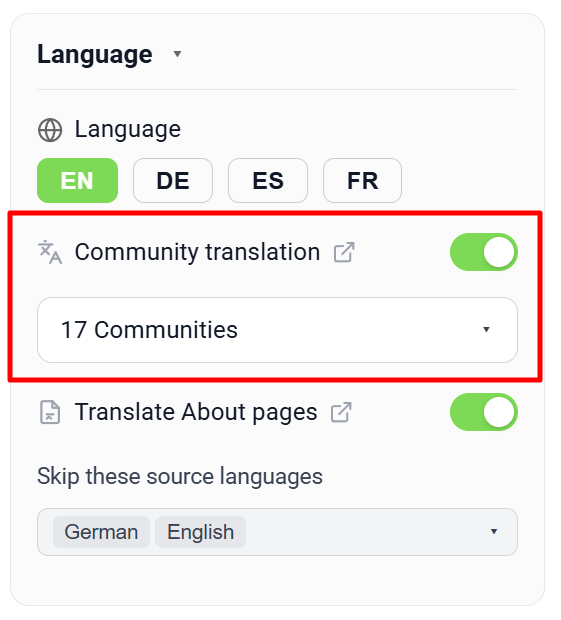
𝗖𝗼𝗺𝗺𝘂𝗻𝗶𝘁𝘆 𝗧𝗿𝗮𝗻𝘀𝗹𝗮𝘁𝗶𝗼𝗻 — 𝗥𝗲𝗮𝗱 𝗮𝗻𝗱 𝗪𝗿𝗶𝘁𝗲 𝗶𝗻 𝗬𝗼𝘂𝗿 𝗢𝘄𝗻 𝗟𝗮𝗻𝗴𝘂𝗮𝗴𝗲 𝗔𝗰𝗿𝗼𝘀𝘀 𝗦𝗸𝗼𝗼𝗹 Skool is a global platform, and the most interesting communities aren't always in your language. Until now, that meant either skipping posts you couldn't read or pasting them into a translation tab. Community Translation flips that on its head: pick the communities where you want to read in your own language, and posts, comments, replies, the live stream and the group chat are all translated automatically as you scroll. Once you switch the master toggle on in Settings → Language, you can pick any number of communities from your joined list. From that moment on, every post detail page, feed card and comment thread inside those communities renders in your interface language — German, Spanish, French or English. A translate icon next to each post lets you flip back to the original text in one click and back again without re-fetching, because every translation is cached locally and on a hybrid backend so that the next visitor (or your next visit) loads it instantly. The same toggle also powers a big "Translate" composer button placed right next to the Post / Reply / Comment submit buttons, so you can write in your own language and translate the entire draft to the community's language before publishing. The button respects mentions like @First Name — they are masked out before being sent to the translator and reinserted afterwards as real mention links with profile IDs intact, so links never break. Bold-Unicode formatting and line breaks survive the round-trip too. The same protection applies to the auto-translation of posts and comments — mentions stay clickable in the translated version. The community language is read once from Skool's discovery API and cached, so the toolkit knows exactly which language pair to translate (Spanish → German, English → French, etc.). Communities whose language matches yours are skipped silently. The whole feature is free for all users — no Premium gating.
🔥
4 likes • May 5
Ausgezeichnet👍
1-7 of 7

🔥
@axel-sulin-4560
Hi, mein Name ist Axel Süßlin.
Und ich liebe Kinder- & Jugendfußball.
Mein Motto:👉 „JEDER kann etwas besonders gut!“
Active 6h ago
Joined Apr 1, 2026
75382 althengstett
Powered by