Activity
Mon
Wed
Fri
Sun
Sep
Oct
Nov
Dec
Jan
Feb
Mar
Apr
May
Jun
Jul
Aug
What is this?
Less
More
Owned by Demetrice
Calm space for entrepreneurs, creators, & small business owners to reduce AI overwhelm, turn ideas into real content, income & clarity.
Public Speaking - Vocal Power
441 members • $14/month
The Digital Front Porch
461 members • Free
DesignHER State of Mind
204 members • Free
Front Porch VIP Legacy Vault
64 members • $157
Skool Scale Camp
5.8k members • Free
Witty's Creator Hub
44 members • Free
Connected Through Play
301 members • Free
Certified Vibe Code Specialist
87 members • $147
Certified AI Consultant - CPD
27 members • $77
3 contributions to Skool Extensions 🧩

🔥
Jul 15 •
Is there a reply you use all the time?
Did you know that you can create a template for it?!!! Once you create that... the little notebook paper will show up in the replay comment box!!! This is such a time saver!!! I love it! I have a few good ones saved so they aren't always the same!


🔥
3 likes • Jul 15
I just started using this extension. It is amazing! Now I have something new to go play with. Thanks.
🔥
1 like • Jul 15
@Kristine Alise I just saw an update about badges and I gotta figure that out now. It's like having a new toy.

🔥
Mar 13 •
Bookmarks
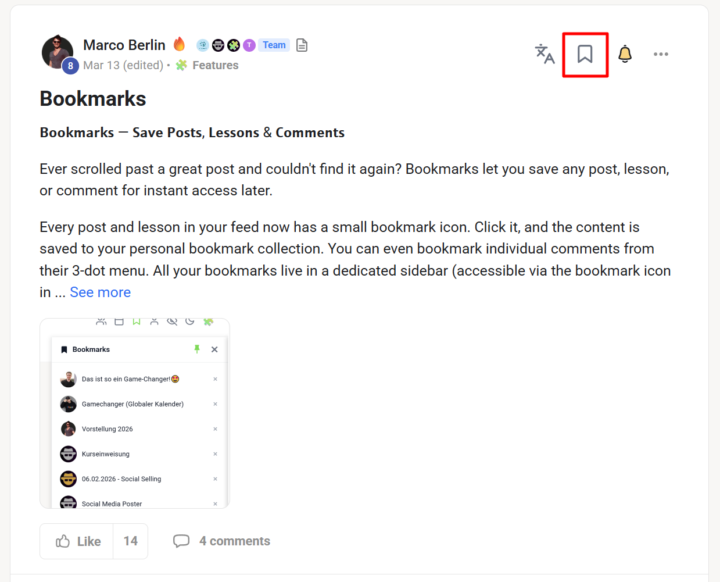
𝗕𝗼𝗼𝗸𝗺𝗮𝗿𝗸𝘀 — 𝗦𝗮𝘃𝗲 𝗣𝗼𝘀𝘁𝘀, 𝗟𝗲𝘀𝘀𝗼𝗻𝘀 & 𝗖𝗼𝗺𝗺𝗲𝗻𝘁𝘀 Ever scrolled past a great post and couldn't find it again? Bookmarks let you save any post, lesson, or comment for instant access later. Every post and lesson in your feed now has a small bookmark icon. Click it, and the content is saved to your personal bookmark collection. You can even bookmark individual comments from their 3-dot menu. All your bookmarks live in a dedicated sidebar (accessible via the bookmark icon in the top navbar) where you can see them at a glance — complete with the author's avatar and post title. Want to reorganize? Just drag and drop bookmarks to reorder them however you like. Click any bookmark to jump straight to that content. Need to clean up? Hit the small "×" to remove entries you no longer need. Your bookmarks persist across sessions, so they're always there when you come back. --- 𝗟𝗲𝘀𝗲𝘇𝗲𝗶𝗰𝗵𝗲𝗻 — 𝗣𝗼𝘀𝘁𝘀, 𝗟𝗲𝗸𝘁𝗶𝗼𝗻𝗲𝗻 & 𝗞𝗼𝗺𝗺𝗲𝗻𝘁𝗮𝗿𝗲 𝘀𝗽𝗲𝗶𝗰𝗵𝗲𝗿𝗻 Schon mal an einem tollen Post vorbei gescrollt und ihn nicht mehr wiedergefunden? Lesezeichen lassen dich jeden Post, jede Lektion und jeden Kommentar für sofortigen Zugriff speichern. Jeder Post und jede Lektion in deinem Feed hat jetzt ein kleines Lesezeichen-Icon. Klick darauf, und der Inhalt wird in deiner persönlichen Lesezeichen-Sammlung gespeichert. Du kannst sogar einzelne Kommentare über deren 3-Punkte-Menü bookmarken. Alle deine Lesezeichen leben in einer eigenen Sidebar (erreichbar über das Lesezeichen-Icon in der oberen Navbar), wo du sie auf einen Blick sehen kannst — komplett mit Autor-Avatar und Post-Titel. Willst du umsortieren? Ziehe Lesezeichen einfach per Drag & Drop in die gewünschte Reihenfolge. Klick auf ein Lesezeichen, um direkt zum Inhalt zu springen. Aufräumen? Klick das kleine "×", um Einträge zu entfernen, die du nicht mehr brauchst. Deine Lesezeichen bleiben über Sessions hinweg gespeichert — sie sind immer da, wenn du wiederkommst.
🔥
3 likes • Jul 15
This bookmark feature has been so helpful keeping track of posts I want to go back to in other communities.
🔥
Mar 13 •
Blur Mode
𝗕𝗹𝘂𝗿 𝗠𝗼𝗱𝗲 — 𝗣𝗿𝗶𝘃𝗮𝗰𝘆 𝗳𝗼𝗿 𝗦𝗰𝗿𝗲𝗲𝗻𝘀𝗵𝗼𝘁𝘀 & 𝗦𝗰𝗿𝗲𝗲𝗻 𝗦𝗵𝗮𝗿𝗶𝗻𝗴 Need to take a screenshot of your community or share your screen during a call? Blur Mode instantly obscures all profile pictures and usernames on the page — protecting the privacy of your community members. Click the user icon in your navbar and every avatar gets blurred, every name becomes unreadable. The smart part: your own profile stays completely visible, so you can still see your own posts, comments, and avatar without any blur. This way you maintain full context of your own content while keeping everyone else's identity private. Perfect for tutorials, screen recordings, or anytime you want to share what's happening in your community without exposing member identities. One click to blur, one click to unblur. --- 𝗕𝗹𝘂𝗿 𝗠𝗼𝗱𝗲 — 𝗗𝗮𝘁𝗲𝗻𝘀𝗰𝗵𝘂𝘁𝘇 𝗳ü𝗿 𝗦𝗰𝗿𝗲𝗲𝗻𝘀𝗵𝗼𝘁𝘀 & 𝗕𝗶𝗹𝗱𝘀𝗰𝗵𝗶𝗿𝗺𝗳𝗿𝗲𝗶𝗴𝗮𝗯𝗲 Musst du einen Screenshot deiner Community machen oder deinen Bildschirm in einem Call teilen? Der Blur Mode macht sofort alle Profilbilder und Benutzernamen auf der Seite unkenntlich — und schützt so die Privatsphäre deiner Community-Mitglieder. Klick auf das User-Icon in deiner Navbar und jeder Avatar wird unscharf, jeder Name unlesbar. Das Smarte daran: Dein eigenes Profil bleibt komplett sichtbar — du siehst weiterhin deine eigenen Posts, Kommentare und deinen Avatar ganz ohne Blur. So behältst du den vollen Überblick über deine eigenen Inhalte, während die Identität aller anderen geschützt bleibt. Perfekt für Tutorials, Bildschirmaufnahmen oder immer dann, wenn du zeigen willst, was in deiner Community passiert, ohne Mitglieder-Identitäten preiszugeben. Ein Klick zum Blurren, ein Klick zum Aufheben.

🔥
2 likes • Jul 15
Oh this is a great feature! I just recently installed the extension and I am loving it so far.
1-3 of 3

🔥
@dee-odds-9099
Veteran | Certified Vibe Coder & Ai Consultant for entrepreneurs, creators & small business owners turn ideas to real content, income & clarity
Active 20m ago
Joined Jul 10, 2026
Crestview, Florida
Powered by