Activity
Mon
Wed
Fri
Sun
Oct
Nov
Dec
Jan
Feb
Mar
Apr
May
Jun
Jul
Aug
Sep
What is this?
Less
More
AI Survival Academy
42 members • Free
ClickUp Masters
357 members • Free
Affinity Creatives
2.4k members • Free
The SEO + AI Accelerator
242 members • Free
ChatGPT Users
12.8k members • Free
Bubble Gods
31 members • Free
DaVinci Resolve FREE Community
29.2k members • Free
E-Ink Tablet Users
1.4k members • Free
7 contributions to E-Ink Tablet Users

Jul 16 •
Who is using CalSync on a Supernote?
We are wanting to verify an issue some are having on sign-in to the cloud. Anyone getting a message asking for a one time verification code when they put their credentials in Calsync to sync over the supernote cloud? Please respond with a screenshot of the error. Getting an error in CalSync on sign-in to the Supernote cloud?
Poll
15 members have voted

1 like • Jul 27
@Jason Smith Just circling back, yes this has word 100% As always you are appreicated. I believe in this product and glad to help when I can. Because of this i really built the Remarkable an the supernote in to my work and personal flow. So thank you!
2 likes • Jul 27
@Jason Smith yes working perfect now
Jul 25 •
🚀 CalSync 1.4.13 is here!
This is one of our biggest updates yet! We’ve added account management inside CalSync, removed Summary Page limits for all paid plans, introduced new Paper Move templates, added Chinese language support, and packed in dozens of improvements across the app. ✨ What’s New 👤 Manage your account without leaving CalSync A new Account section lets you manage everything in one place. - View your current plan - Update your payment method - Download invoices - Switch between multiple account emails - Cancel your subscription 📖 Unlimited Summary Pages All paid plans now include unlimited Summary Pages. The only limit is how many pages appear directly inside a single section (to keep navigation usable): - 3 pages on reMarkable Paper Move - 5 pages on larger tablets 🎨 New Paper Move note templates Five new templates have been added for the reMarkable Paper Move: - Lines - Checklist - Grid - Blank - Half Templates are optimized for e-ink with darker strokes, and templates that don’t support your device are now hidden instead of appearing locked. 📅 A redesigned planner cover Your planner cover now features a beautiful two-column layout with: - Today’s agenda - Cleaner organization - A new Today button on Day pages so you can jump back to the current day with a single tap. 🌤️ Customize the Clarity planner You can now customize the Clarity Day View sidebar directly from Edit Planner. Choose: - Top Three size - Task list size - Custom section names - Show or hide the QR code 🌏 Chinese language support CalSync can now generate planners in Chinese, with proper font support and fully localized date headers. 🔧 Repair older Supernote planners ☁️ More reliable calendar connections We’ve made calendar connections much more reliable. This update improves: - Google Calendar - Outlook - Apple iCloud - webcal:// subscription links iCloud calendars that previously failed validation now connect correctly. ⚡ Better syncing & connection stability
1 like • Jul 25
Thank you!
Jul 16 •
Where do i find the update file on Windows PC? when updating from the app.
Hey Community, have a great chat with @Jason Smith about this. something i thought was small but ended up being a great thing to share. So inside the CalSyn App (On a windows PC), If you click the Install Update it should download the extract file for you to install. (Simple enough). But, If you use OneDrive to sync your desktop you will not see the downloaded file. After speaking with Jason, it turns out OneDrive hide it an does not show it on the Desktop so you will need to go to C:\Users\<user>\OneDrive\Desktop An, behold! There is your update file. If your like me you will find the last 8 update they you thought just didn't download. I hope this helps someone that couldnt figure it out like me.

Jul 2 •
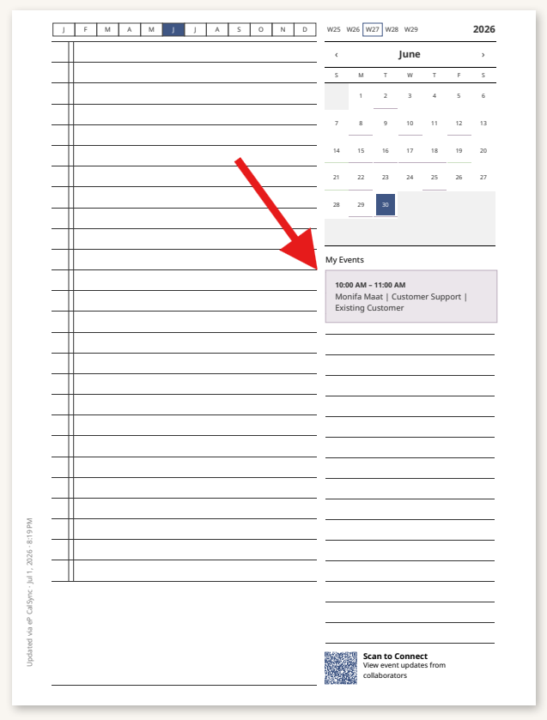
Issue with Color showing for Events
I made sure to turn color on and i also switched it off and back on but the event just show as a grey even (not greyscale) I also made sure the events have color in outlook. All event look like that in the screenshot. What am i doing wrong?
0 likes • Jul 6
Circling back to this, actually I think it is a permission thing on my end with office 365. So what I did was add the the Holiday calendar option that is in the app and those show in color no problem so i need to check stuff on my end. Thank you
0 likes • Jul 7
@Jason Smith yes in error but i fixed it thank didnt notice that LOL
Jul 5 •
🚀 CalSync 1.4.4 is Now Available!
We've just released CalSync 1.4.4 with a bunch of improvements focused on reliability, customization, and making it easier to troubleshoot when something goes wrong. 🎨 Planner Cover Colors You can now give each planner its own cover color. • Pick a color in Edit Planner. • The cover artwork automatically adjusts. • Titles, dates, QR codes, and logos switch between light and dark for readability. • Planner cards and device badges now match the selected color, making multiple planners much easier to identify. 🔍 Better Sync Error Details When a sync fails, you'll now see an error icon in the Activity page. Click it to see exactly what happened instead of just "Failed," whether it's a network issue, expired cloud login, or something else. ☁️ More Reliable Cloud Connections We've improved reliability throughout the connection process. • More dependable reMarkable Cloud pairing. • Switching between Cloud, Direct, and Universal now behaves correctly. • Connection status updates instantly. • Status indicators no longer flicker during brief network interruptions. ✅ One-Click Connection Diagnostics Diagnostics now perform a true end-to-end test for both reMarkable Cloud and Supernote. A tiny test file is uploaded, verified, and automatically removed so you know everything is working without leaving anything behind. 📁 Better Folder Syncing Moving a planner to another folder—or sending a brand-new planner—now reliably appears on your reMarkable without requiring another restart. ⚙️ Stability Improvements • Daily Carousel processing is now more resilient. • Sync failures identify exactly which step failed. • USB users receive better guidance when a cable disconnects. ✨ General Improvements • Clearer "Included with your plan" wording. • Cleaner planner list layout. • Numerous bug fixes and performance improvements throughout the app. Update from inside CalSync when prompted, or download the latest version using your original download link. As always, we'd love to hear your feedback once you've had a chance to use it!

0 likes • Jul 6
Will the option to Sync to the My Files come back? I was working great on the last version. I rather have the Planner on my main screen rather then in a sub folder if possible.
1-7 of 7

Active 20d ago
Joined Jul 2, 2026
NYC
Powered by