Activity
Mon
Wed
Fri
Sun
Sep
Oct
Nov
Dec
Jan
Feb
Mar
Apr
May
Jun
Jul
Aug
What is this?
Less
More
E-Ink Tablet Users
1.4k members • Free
26 contributions to E-Ink Tablet Users

Jul 5 •
🚀 CalSync 1.4.4 is Now Available!
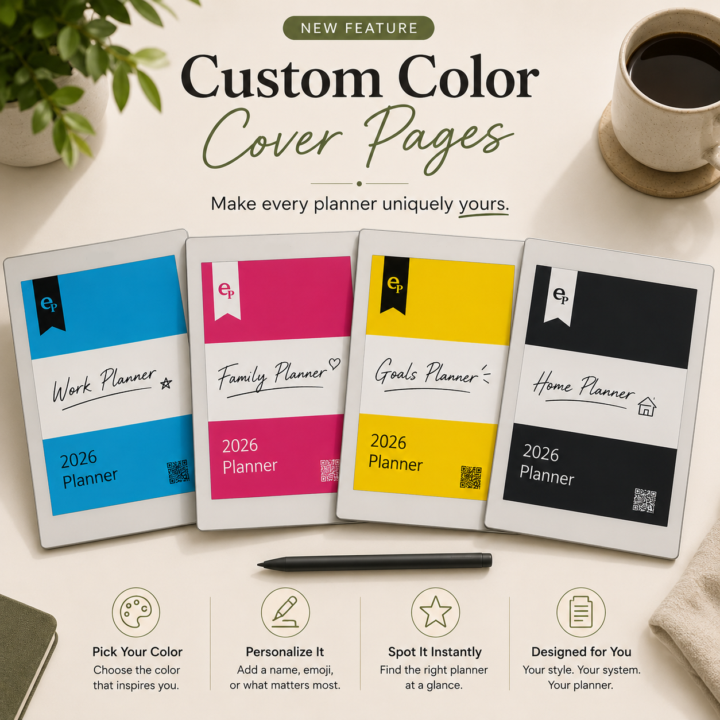
We've just released CalSync 1.4.4 with a bunch of improvements focused on reliability, customization, and making it easier to troubleshoot when something goes wrong. 🎨 Planner Cover Colors You can now give each planner its own cover color. • Pick a color in Edit Planner. • The cover artwork automatically adjusts. • Titles, dates, QR codes, and logos switch between light and dark for readability. • Planner cards and device badges now match the selected color, making multiple planners much easier to identify. 🔍 Better Sync Error Details When a sync fails, you'll now see an error icon in the Activity page. Click it to see exactly what happened instead of just "Failed," whether it's a network issue, expired cloud login, or something else. ☁️ More Reliable Cloud Connections We've improved reliability throughout the connection process. • More dependable reMarkable Cloud pairing. • Switching between Cloud, Direct, and Universal now behaves correctly. • Connection status updates instantly. • Status indicators no longer flicker during brief network interruptions. ✅ One-Click Connection Diagnostics Diagnostics now perform a true end-to-end test for both reMarkable Cloud and Supernote. A tiny test file is uploaded, verified, and automatically removed so you know everything is working without leaving anything behind. 📁 Better Folder Syncing Moving a planner to another folder—or sending a brand-new planner—now reliably appears on your reMarkable without requiring another restart. ⚙️ Stability Improvements • Daily Carousel processing is now more resilient. • Sync failures identify exactly which step failed. • USB users receive better guidance when a cable disconnects. ✨ General Improvements • Clearer "Included with your plan" wording. • Cleaner planner list layout. • Numerous bug fixes and performance improvements throughout the app. Update from inside CalSync when prompted, or download the latest version using your original download link. As always, we'd love to hear your feedback once you've had a chance to use it!

0 likes • Jul 5
Strangely the cover (whe openen on remarkable pro) is as the color i wanted. But as an document the same old color shows.
1 like • Jul 8
@Jason Smith its works great now
Jun 14 •
🚀 CalSync v1.2.4 is Available Now!
This release focuses on planner readability, improved reMarkable compatibility, calendar feed reliability, and several important fixes requested by the community. What’s New Event Font Size Control You can now fully control how large event text appears in your planners. • Use the Event Font Size slider in Edit Planner• Type a custom value directly for even more control• Larger text automatically adjusts event blocks to fit properly• Works across all planner types and views Improved Color E-Ink Support Calendar colors now render much more vividly on color e-ink devices such as the reMarkable Paper Pro. • Colors no longer appear washed out• Better visual separation between calendars• Improved readability throughout your planner Calendar Color Fixes Changing calendar colors in Edit Planner now correctly applies those changes when you regenerate a planner. Cleaner Event Layouts Event text now stays neatly inside its assigned event block. • Long titles automatically truncate with an ellipsis (…)• No more overflowing event text• Consistent behavior across Day, Week, Month, 3-Day, and Time-Block views Improved reMarkable Compatibility We’ve made significant improvements for newer reMarkable devices and firmware versions. • Improved compatibility with reMarkable Paper Pro• Better support for firmware 3.x• More reliable folder creation and indexing• Planners appear on-device more consistently Better Planner Naming Planners are now named using the planner’s actual name when transferred to your device, making them much easier to identify. Calendar Feed Improvements Fixed issues affecting published and subscribed calendars. • iCloud webcal feeds now load correctly• Non-secure HTTP calendar feeds are now supported• Fixed cases where subscribed calendars displayed no events Folder Sync Fixes Resolved issues that could create duplicate folders or incorrectly reuse existing folders during planner synchronization. Startup Reliability Fixed a startup issue that could prevent CalSync from opening on certain systems.
0 likes • Jun 14
Sorry. In timeblock times appear in AM/PM although i choose 24h format. Colors still appear in grayscale although i choose color and uses bright colors for my planners.
0 likes • Jun 14
[attachments]
Jun 4 •
CalSync v1.1.6 Released
We’ve just released CalSync v1.1.6 with improvements focused on making purchasing, licensing, and planner creation even easier. What’s New ✅ New Ad Hoc Planner Option - Added a new one-time purchase option for users who only need a planner for a specific calendar year. ✅ Simpler Planner Setup - Improved the planner creation process to make getting started faster and more straightforward. ✅ Better Purchase Experience - Added clearer information during checkout so it’s easier to understand what each plan includes before purchasing. ✅ Improved Account & License Management - Made license activation and account updates more reliable across all plans. ✅ Enhanced Planner Reliability - Improved planner generation and validation to help ensure everything works as expected. ✅ General Improvements - Bug fixes - Performance enhancements - User interface refinements Download v1.1.6 Apple Silicon (M1 / M2 / M3)https://www.einkpads.io/api/calsync/darwin/arm64/releases/latest Intel Machttps://www.einkpads.io/api/calsync/darwin/x64/releases/latest Windowshttps://www.einkpads.io/api/calsync/win32/releases/latest Linuxhttps://www.einkpads.io/api/calsync/linux/x64/releases/latest Thank you for your continued support and feedback. Every update is driven by suggestions from this community, and we appreciate everyone helping us make CalSync better.
0 likes • Jun 5
Still no color frontpage for pro users.
0 likes • Jun 5
@Jason Smith yes. Maybe choose your own color per year
May 29 •
Dutch translation
Hi There. What kind of translations do you need to have the calender from Calsync in Dutch? (p.e. May = Mei)

May 23 •
Daily Event Carousel and Google Calendar events not updating
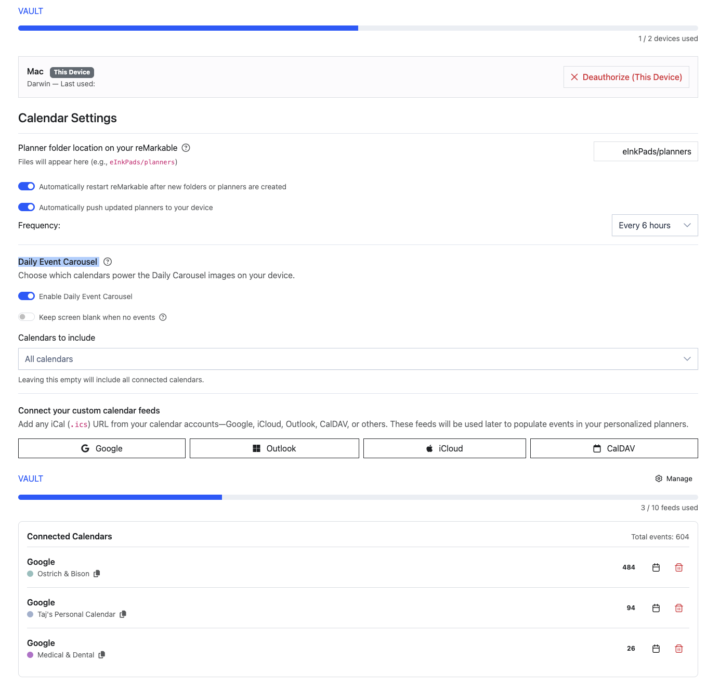
I have the Daily Event Carousel turned on and a planner set up. Neither the planner nor the Daily Event Carousel is updating. I am able to restart the device from EP, and I don't receive any errors when I push an update to the device. I can't figure out what I have done wrong or have misconfigured. Any ideas for me?
0 likes • May 23
You has to have your remarkable connected to your computer to update planner and Event Carousel
1-10 of 26