Activity
Mon
Wed
Fri
Sun
Nov
Dec
Jan
Feb
Mar
Apr
May
Jun
Jul
Aug
Sep
Oct
What is this?
Less
More
NextPhase AI
1.8k
Free
AI Workshop Lite
66k
Free
Brendan's AI Community
27.5k
Free
AI Builders Hub
1.2k
Free
Voice AI Bootcamp 🎙️🤖
9.2k
Free
Samin's Free AI Resource Hub
23.9k
Free
The AI Advantage
129.8k
Free
Maker Zero: Claude Code, AI
28.2k
Free
HighLevel Huddle w/ Clay
3.9k
Free
20 contributions to Clief Notes

11h •
01 - How I started
So, starting completely from scratch... The first thing I did was actually not build anything. 😄 I looked around. I started with the Classroom, specifically Getting Started and the first lessons of The Foundation. If you are completely new here, go and do that. It’s time well spent. Then if you want come back here. When I approached Module 4 in The Foundation I had a few questions. Mind you, at the time it was not as nicely organised as it is now. It has improved enormously. Thank you @Jake Van Clief Anyway, the questions appearing in my head went something like this: How do I pick the right folders? Where do these .md files come from? Do I write them? How would I know they have everything inside them that my project needs? What even is my project? Can I have multiple CLAUDE.md or AGENTS.mdfiles? Where is my real folder root? Do I have multiple projects in the same folder? Can I add more stuff later?... Sound familiar? 😄 In the end, it all boiled down to one question: How are people actually doing this? 🔎 So I stopped the Classroom for a while and the search bar became my best friend. The more I searched and the more I looked around, I slowly but surely figured something out: There seems to be more than one way of building an ICM. Some members loaded Jake’s & David's ICM material/research paper into their LLM of choice and built from there. Other members started with the icm-architect skill. Others did a combination of both. And yet another group used the icm-architect together with something called the Workspace Blueprint. The bottom line for me was: ❗Many roads lead to Rome. Pick one. ❗ While combing through the group with my best pal, the search bar, I also came across some really interesting videos and posts which helped clear things up for me. Some were easy to find. Others were hidden away somewhere in the dusty abyss of the Skool community posts. 😄 In hindsight, I think searching around for a while was actually very useful. It helped me connect the dots and, more importantly, stopped me from immediately jumping into building something without really knowing what I wanted.

2 likes • 11h
I hope I was able to help you in some small way. Incredible people in this community. I’m so impressed by all of you.

2d •
Extremely confused
I really want to love this course, but every time I sit down to work through lessons, I don't know what to do. The instructions don't seem clear to me and the more I watch the more confused I get.
2 likes • 2d
Great call on @Ry Mac I love how he is productizing the intake and build. I created a visual version of it with node-based react modules that steer the SOP. In the end - just give Claude or Codex the ICM paper or a link to it in an empty folder, ask it to learn it and act as if it was jake Van Clief - boom! You’re in business. Share your vision in plan mode - walk thru what you want and tell Claude when we are ready, build the folders as we planned. You then have a solid start. Open the folders. Read them. So some dry runs with them connected (“mounted”) in the session.
6d •
What I’m currently building
Just wanted to share this, our sizzle real credits, ICM and the work done by jake and david. Enjoy. https://www.linkedin.com/posts/authengine-ai_authoritybydesign-evidencebasedmarketing-activity-7511098650694070272-cijm?utm_medium=ios_app&rcm=ACoAAAARN-kBA7tcKwnnmxNTHknHyMrNyUsXBRU&utm_source=social_share_video_v2&utm_campaign=copy_link
1 like • 6d
This video was 100% built by folders by asking Claude to go look at the ICM and make a sizzle reel. It found context and interviews and Google meet recordings.

👑
7d •
How am I making my new animations?
Just made a video on How to Make AI Videos That Don't Feel Like AI Slop Also finally nailed down my voice model to sound really good. The whole video shows its own making, from the voice to the storyboard, the animation and the render, all out of one folder on my computer. Even shows how quickly you can create different styles as well! I'm also adding the templates to the vault tonight, and updating the Implementation Playbooks to focus on this, with a whole new set of lectures. More soon! If you are loving my work I really would love some support, if you subscribe to premium you can support me to make more free resources for everyone else! Upgrade Here!
2 likes • 7d
The reason I like to do those tests is because it’s a strong reminder that building with folders and not worrying about limitations of each of the different agents or product agent agents is refreshing. The cool thing about automating a workflow in a folder like jake has taught us is that you can really quickly spin around a completely new render customized for every prospect or audience. Check out this link. https://assets.cdn.filesafe.space/EqvUNdJdeOUstZhEDGIM/media/6abc7156dbed623a52f579a5.mp4
0 likes • 7d
@Michael Berezny yes. Easily.

Jul 10 •
New to ICM? Get hands on learning experience here
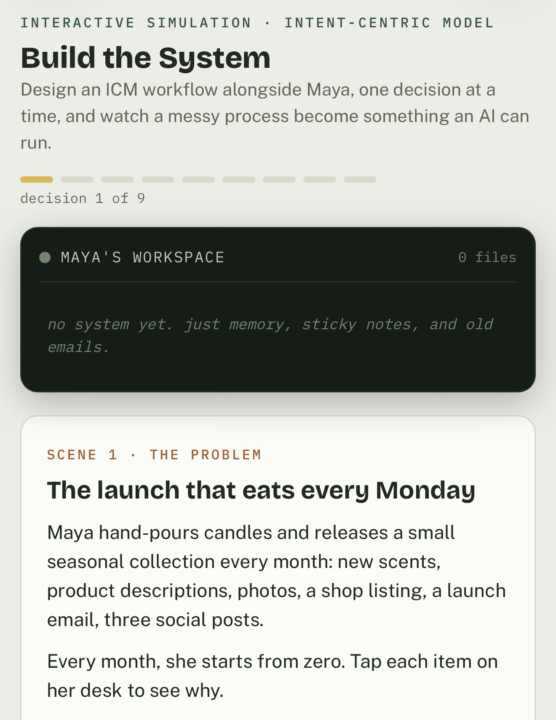
Step-by-step interactive guide from idea to output. Design an ICM workflow alongside Maya, one decision at a time, and watch a messy process become something an AI can run again and again. Right now, Maya has to try to remember what needs to be done and where each piece of information is kept. She needs a better solution. https://claude.ai/public/artifacts/7c9618f4-8324-4048-902c-cbcf77c9c102 Let’s build one with her. 😀
1 like • 12d
@Carla Bosteder May I have permission to make a video with your tool as the visual aide?!?!?!? So good
1-10 of 20

Active 11h ago
Joined Apr 5, 2026
Powered by