Activity
Mon
Wed
Fri
Sun
Sep
Oct
Nov
Dec
Jan
Feb
Mar
Apr
May
Jun
Jul
Aug
What is this?
Less
More
KIW SCHMIEDE
25 members • Free
KI Transformation: Claude Code
465 members • Free
VARY.SCHOOL | AI x Law x Vibe
50 members • Free
Full Stack of Enterprise AI
120 members • Free
Skool Extensions 🧩
825 members • Free
KI Coding Masterclass
94 members • $87/month
KI Builder
324 members • Free
KI-Agenten Campus
789 members • Free
KI trifft Medizin
114 members • Free
6 contributions to Skool Extensions 🧩

🔥
21d •
Skool Dashboard (VIP Feature 💎)
𝗦𝗸𝗼𝗼𝗹 𝗗𝗮𝘀𝗵𝗯𝗼𝗮𝗿𝗱 — 𝗬𝗼𝘂𝗿 𝗰𝗼𝗺𝗺𝘂𝗻𝗶𝘁𝘆 𝗶𝗻 𝗻𝘂𝗺𝗯𝗲𝗿𝘀, 𝗼𝗻 𝗼𝗻𝗲 𝘀𝗰𝗿𝗲𝗲𝗻 𝘆𝗼𝘂 𝗯𝘂𝗶𝗹𝘁 𝘆𝗼𝘂𝗿𝘀𝗲𝗹𝗳 Skool shows you a thin row of stats under your community header and leaves it at that: a number for today, no history, no context, nothing you can arrange. The Skool Dashboard replaces that row with a full view of how your community is actually doing — open it as a side panel next to your work, or as a popup that fills the screen. The layout is yours. Drag any tile to where you want it, group tiles into blocks you name yourself, collapse the ones you rarely look at, and reset the whole thing whenever it has drifted. Your layout and your revenue goals travel with you — they are cloud-synced, so the dashboard looks the same on your laptop and your desktop. On top sit the curves: members and revenue over time, projected 30 and 90 days ahead from your own trend, plus 15 milestones on the way to the revenue goal you set — each with the amount still missing and the date it is on track for. The member curve is there from the first day, because Skool keeps that history; the revenue curve is built from daily snapshots the Extension takes for you, so a fresh install needs a few days before it has a line worth reading. Below that, the numbers that explain the curves. Where your members come from — visitors, signups and new revenue split by acquisition channel — next to premium and VIP members, running trials, engagement and your ranks in the Skool Finder by category, language and overall. Tiles from your own panels join them: open tasks including the overdue ones, pipeline contacts, tagged contacts, bookmarks and text templates, each one a click away from the panel it belongs to. Your own numbers are part of it too: the streak flame, your longest streak, the points still missing to the next level, what you did today across all your communities, and your contribution grid. Run several communities and the dashboard adds them up by default — every community you administer in one set of figures — with a filter in the header to drop down to a single one. Goals follow that filter, so an overall target and a per-community target can exist side by side.


12 likes • 21d
WoW 🤯 🔥🔥🔥
🔥
Jun 20 •
Schedule Posts (VIP Feature 💎)
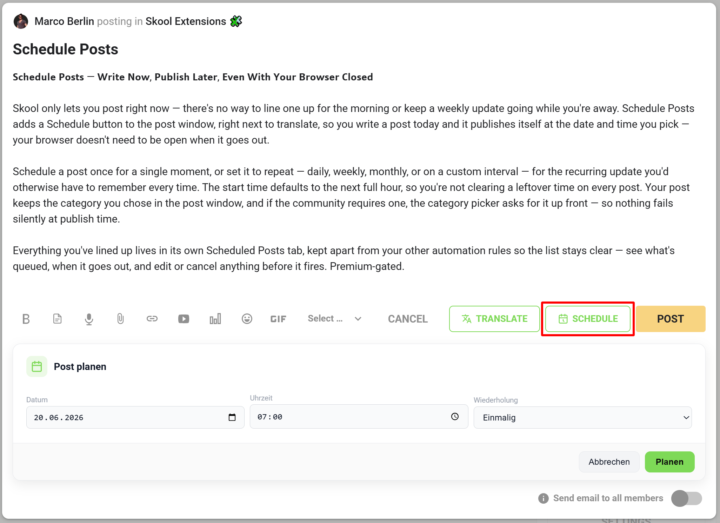
𝗦𝗰𝗵𝗲𝗱𝘂𝗹𝗲 𝗣𝗼𝘀𝘁𝘀 — 𝗪𝗿𝗶𝘁𝗲 𝗡𝗼𝘄, 𝗣𝘂𝗯𝗹𝗶𝘀𝗵 𝗟𝗮𝘁𝗲𝗿, 𝗘𝘃𝗲𝗻 𝗪𝗶𝘁𝗵 𝗬𝗼𝘂𝗿 𝗕𝗿𝗼𝘄𝘀𝗲𝗿 𝗖𝗹𝗼𝘀𝗲𝗱 Skool only lets you post right now — there's no way to line one up for the morning or keep a weekly update going while you're away. Schedule Posts adds a Schedule button to the post window, right next to translate, so you write a post today and it publishes itself at the date and time you pick — your browser doesn't need to be open when it goes out. Schedule a post once for a single moment, or set it to repeat — daily, weekly, monthly, or on a custom interval — for the recurring update you'd otherwise have to remember every time. The start time defaults to the next full hour, so you're not clearing a leftover time on every post. Your post keeps the category you chose in the post window, and if the community requires one, the category picker asks for it up front — so nothing fails silently at publish time. Everything you've lined up lives in its own Scheduled Posts tab, kept apart from your other automation rules so the list stays clear — see what's queued, when it goes out, and edit or cancel anything before it fires. --- 𝗣𝗼𝘀𝘁𝘀 𝗽𝗹𝗮𝗻𝗲𝗻 — 𝗝𝗲𝘁𝘇𝘁 𝘀𝗰𝗵𝗿𝗲𝗶𝗯𝗲𝗻, 𝘀𝗽𝗮̈𝘁𝗲𝗿 𝘃𝗲𝗿𝗼̈𝗳𝗳𝗲𝗻𝘁𝗹𝗶𝗰𝗵𝗲𝗻, 𝗮𝘂𝗰𝗵 𝗯𝗲𝗶 𝗴𝗲𝘀𝗰𝗵𝗹𝗼𝘀𝘀𝗲𝗻𝗲𝗺 𝗕𝗿𝗼𝘄𝘀𝗲𝗿 Skool lässt dich nur sofort posten — es gibt keine Möglichkeit, einen Beitrag für den Morgen vorzubereiten oder ein wöchentliches Update laufen zu lassen, während du weg bist. „Posts planen" fügt dem Postfenster einen Planen-Button hinzu, gleich neben „Übersetzen": Du schreibst einen Post heute, und er veröffentlicht sich von selbst zum Datum und zur Uhrzeit, die du wählst — dein Browser muss dafür nicht offen sein. Plane einen Post einmalig für einen einzelnen Zeitpunkt oder stell ihn auf wiederkehrend — täglich, wöchentlich, monatlich oder im eigenen Intervall — für das regelmäßige Update, an das du sonst jedes Mal denken müsstest. Die Startzeit steht standardmäßig auf der nächsten vollen Stunde, sodass du keine übrig gebliebene Uhrzeit bei jedem Post wegklicken musst. Dein Post behält die Kategorie, die du im Postfenster gewählt hast, und braucht die Community eine, fragt die Kategorie-Auswahl gleich danach — so scheitert nichts still beim Veröffentlichen.
4 likes • Jun 20
Das ist komplett crazy was du da machst @Marco Berlin Skool ist einfach INfra auf der du ne Komplett andere Software via Extension aufsetzt Du weißt ja Marco ich schätze und feier dich sehr und dass du auch coole sachen entwickelst macht dich nochmal sympathischer
🔥
Jun 19 •
🔥 Moderator #2 Found!
Looks like @Kimberly Armatys won't be alone for long. I've now found a second moderator for the community! Please give a warm welcome to @Kristine Alise 👇🏼 Together, they'll help create more engagement, discussions, ideas, and activities to make this community even better. I'm excited to see what we'll build together and what will emerge from this community in the months ahead. 🚀

11 likes • Jun 19
[attachment]
🔥
May 28 •
Workflow Builder (VIP Feature 💎)
𝗪𝗼𝗿𝗸𝗳𝗹𝗼𝘄 𝗕𝘂𝗶𝗹𝗱𝗲𝗿 — 𝗜𝗙/𝗧𝗛𝗘𝗡 𝗔𝘂𝘁𝗼𝗺𝗮𝘁𝗶𝗼𝗻 𝗳𝗼𝗿 𝗘𝘃𝗲𝗿𝘆 𝗦𝗸𝗼𝗼𝗹 𝗘𝘃𝗲𝗻𝘁 The Workflow Builder lets you automate Skool events without leaving the platform — pick a trigger, chain one or more actions, save the rule, and the server fires it for you 24/7. No external automation tool, no permanently open browser, no missed events while your laptop is asleep — the rules run server-side on a 30-second poll cycle, and every fire shows up in a per-rule log directly inside Skool Extensions. Thirteen triggers cover the full Skool surface: new DM, new notification, new group-chat message, new community member, pending join request, card declined, member cancelling, member cancelled, member left, member tier change, daily member-activity threshold, live call starting (with configurable lead time), and scheduled time — once, daily, weekly, monthly, or a custom interval. Triggers that operate on a community (e.g. new member) accept multiple community slugs at once via a comma-separated list, so one rule can cover all your communities at the same time. Seven action types are wired in: send a DM as you, send a self-notification DM, fire a webhook, fire a fully-configurable HTTP request (with method, headers, query parameters, and body), create a post in a community, send an email, and accept a pending join request. Chain as many actions per rule as you want. A "Wait for reply" step between two DM actions lets you set how many hours to give the user before the follow-up fires — and the second DM auto-skips if the user replies inside the window. Proper drip-style follow-up without external tools. Every rule has a Test button. Click it and the server pulls a live sample from Skool (the latest DM, the most recent member request, your real upcoming live calls) and runs your rule against it. Destructive actions — sending a real DM, accepting a real join request — show a preview first and only fire after you confirm. Webhooks and HTTP requests fire immediately and carry an "X-Skool-Ext-Test: 1" header so your downstream system can recognize and ignore them. Each test writes one row in the per-rule log so you see exactly what happened, including the full request/response and the skip reason if the condition didn't match.

3 likes • May 28
If @Marco Berlin ships Workflow builder ➡️ Than build Awesome automations
🔥
May 27 •
🧩 Skool Extensions News
Will you be part of the first live call here in the community tomorrow? I present the brand new Workflow Builder, which is not available anywhere else for Skool. I also give an insight into the other numerous free and premium features. I also share the agenda with you. There are still a few innovative points on the agenda 🚀 📅 Use the global calendar and select this community here and show that you are there with a check. --- Bist du morgen beim ersten Livecall hier in der Community dabei? Ich präsentiere den brandneuen Workflow Builder, den es so für Skool noch nirgends gibt. Außerdem gebe ich einen Einblick in die weiteren zahlreichen Free- und Premium-Features. Ich teile mit euch auch die Agenda. Da stehen noch ein paar innovative Punkte aufn Plan 🚀 📅 Nutze den Global Kalender und wähle diese Community hier mit aus und zeige mit einem Check, dass du dabei bist.

7 likes • May 27
WoW a Workflow builder. Really. This is insane🔥🚀
1-6 of 6

Active 2h ago
Joined May 15, 2026
Powered by