
Write something
Pinned

Aug 12 •
Say "open the user guide" and the whole library opens
Every install of GHL Command now carries the guide library inside the product. Free or paid, same library. Say this to Claude: open the user guide It opens in your browser as a single page that works offline. Searchable job cards, plain-English guides, and copy-paste prompts with a Copy button on each one. Three moves to try it: 1) Say "open the user guide." 2) Type count in the search box. 3) Hit Copy on the prompt, paste it to Claude, and check the answer against your own account. That is the same on the free tier. Nothing there is held back for paid. Not every card has its guide written yet, and I would rather tell you that than let you find it. The ones that are written carry a "Proven live" mark, and that mark means something specific: the prompt was executed against a real account before we published it. It is enforced by the build, not by good intentions. Change a prompt without proving it live again and the release fails. The rest read "Coming in an update" and arrive on a normal restart. Nothing to reinstall, nothing to download, and no date I am going to promise you and then miss. There is also a new lesson in Start Here: "Get a verified answer in 10 seconds." It walks the whole thing end to end, using a real question a member got a bad answer to, and the three prompt rules that would have prevented it. Already installed? Fully quit Claude once and reopen it. Mac: Cmd+Q. Windows: right-click the tray icon and quit. On Claude Code: /mcp reconnect. Not installed yet? Some of the guides are open to everyone at ghlcommand.com/skills/. Read those first and decide from there. Tell me which guide you opened first.

Pinned
Jul 11 •
Read/write vs. build: GHL Command and the official HighLevel MCP
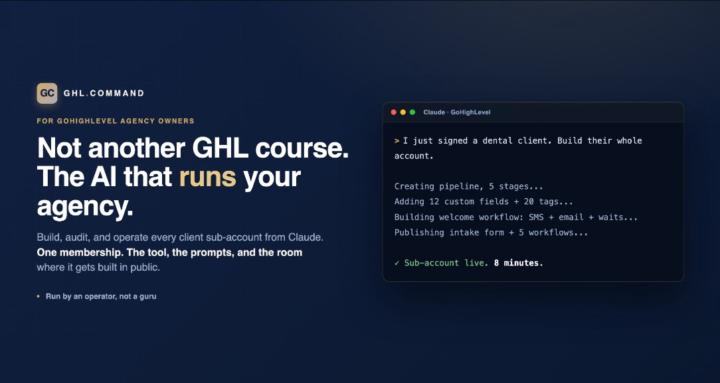
HighLevel now ships an official MCP for Claude. It is free, it is genuinely good, and several of you asked where that leaves GHL Command. This post is the permanent answer. The one-line version: the official MCP reads and writes your CRM. GHL Command builds and fixes it. They stack fine together. The side-by-side, verified against HighLevel's own docs: • Build, edit, and publish workflows: official MCP, no. GHL Command, yes, the full builder. • Deep workflow cloning with every internal ID remapped: official, no. GHL Command, yes. • The silent-failure audit, catching actions that point at deleted stages and fields, which GHL skips with no error: official, no. GHL Command, yes. • Funnels and landing pages: official, no. GHL Command, yes, and recently proven live. • Forms: official reads them only. GHL Command builds them, fields, logic, auto-responder. • Pipelines: official lists them. GHL Command creates and edits them. • Whole-account provisioning: official, no. GHL Command, yes. Blueprint builds a client sub-account from one intake. • Setup: the official MCP wins here, one-click OAuth. Ours is a token plus a one-time Firebase step, and that extra setup is exactly what powers the builders. • Cost: the official MCP is included with your GHL plan. GHL Command is $97 a month for unlimited sub-accounts, with a free read-only tier that includes the audit. Why the difference exists: the public API has no write access to workflows, funnels, or forms, and never has. The official MCP is built on the public API, so it inherits that ceiling. GHL Command works the same internal routes GHL's own builders use, which is harder to maintain and worth it, because building is the part that eats your week. If you only need Claude to read and write your CRM, use the official MCP. It is excellent and free. If you want Claude to actually build and fix your automations, funnels, forms, and whole client accounts, that is GHL Command, and today it is the only thing that does it. And if you want to see what "we maintain the hard part" looks like in practice, the Green Doesn't Mean Working course in the classroom walks a real bug from customer email to shipped fix in one day.
Pinned
Jun 2 •
Start here — Welcome to GHL Command
Welcome in. You're here early, and I don't take that lightly. Quick on what this is. GHL Command is the room for agency owners who use AI to actually run their operations, not just market with it. I run a healthcare agency on this exact stack every day: the GHL Command MCP, Claude, Slack and a small team of named agents. This is where I build it in public, drop the prompts and templates I'm using, and answer your GoHighLevel questions directly. What your membership includes, plainly: - GHL Command: all 250 tools for $97 a month, with every fix and update included while you're a member. - This community: the build-in-public room, the prompts and templates, and me answering questions. - A first look at new products, including beta testing before their public release. Billing runs through Stripe, not Skool. To change or cancel, reply to your welcome email and I'll take care of it. If you cancel, the tool and your spot here wind down together. Simple. Your first 20 minutes: 1. Open the Start Here course in the Classroom. It gets GHL Command installed and gives you a real win in about 10 minutes (point Claude at one of your sub-accounts and have it tell you what's silently broken). 2. Come back and introduce yourself below: who you are, how many sub-accounts you run, and the one GHL task you're most tired of doing by hand. 3. Read the first war story I pinned: "The $5,000 pipeline ID mistake every GHL agency owner makes." It's the bug that started all of this. That's it. Get the tool running, get your first win, then tell me what you want me to build next. This thing grows around what you actually need. Jerry
18h •
Find the Stages Nobody Reaches
Command note: A pipeline stage no deal ever reaches is a promise your process isn't keeping. Stages are instructions. If nothing ever lands in one, either the trigger that moves deals there is broken or the stage describes a step nobody actually does. What a dead stage usually means: • The automation that should move deals in was never connected • The stage was copied from a template and never fit how you sell • Deals skip it because the real work happens off-pipeline Try this prompt in Claude with the GHL Command MCP connected: "List every pipeline in this sub-account. For each stage, count the open opportunities in it and the date of the most recent one moved in. Flag any stage with zero deals, or none moved in during the last 60 days. Read-only, don't change anything." Do it now: 1) Run the prompt on one sub-account — start with the pipeline that matters most 2) Mark each flagged stage: broken trigger, wrong stage, or dead step 3) Fix the trigger or delete the stage by hand in GHL, one change at a time 4) Re-run next month and compare The prompt only reads. Every fix stays a human decision. A stage nobody reaches isn't a stage. It's a wish.
0
0

2d •
Write the Handoff Note Before You Step Away
Command note: If the account only makes sense to the person who built it, it isn't finished. Every build has context that lives in your head: why a stage exists, which workflow is paused on purpose, what the client asked you never to touch. The day you step away, that context walks out with you. What a handoff note covers: • What is live, and what is deliberately switched off • Where the odd decisions are, and why they were made • What the client has asked never to change • Who to ask, and what to check first when something breaks Do it now, in about 20 minutes: 1) Pick one account you could not hand to someone else today 2) Write four short headings: Live, Paused on purpose, Do not touch, First checks 3) Fill each with plain sentences, no jargon only you understand 4) Hand it to someone who has never seen the account and ask them to explain it back 5) Fix every spot where they stumble, then save it where the whole team can find it The test is simple: could a stranger run this account tomorrow using only the note? A build is only as good as the note that lets someone else keep it running.
0
0

1-30 of 151
Suggested communities
Powered by