
Write something

12h •
Find the Contacts With No Owner
Command note: a lead nobody owns is a lead nobody follows up. Automations route by rule. People follow up by name. If a contact has no assigned user, no one feels responsible for it, and it sits. Where unowned contacts come from: • Form and funnel leads that arrive before any routing rule runs • Bulk imports with no owner column • Contacts created by an integration or a webhook • Team members who left and were never reassigned The prompt (read-only, nothing gets changed): "Search this sub-account's contacts and list the ones with no assigned user. Group them by source and by tag. Show the count per group and the five oldest in each. Then list the active users so I can decide who should own what." Do it now: 1) Run the prompt on one sub-account — start with the one you trust least 2) Look at the biggest group first — that is usually one broken intake path, not a hundred separate problems 3) Decide an owner rule — by source, by service, or round-robin 4) Fix the intake path first, then assign the backlog by hand or in a small batch you approve 5) Re-run it next week — the count should only go down The prompt finds them. You decide who owns them. An unowned lead is not a lead. It is a list.
0
0

1d •
Change One Setting at a Time
Command note: if you change five things and the account gets better, you've learned nothing. If it gets worse, you've learned less. The lesson: we once "fixed" a quiet lead flow by editing a trigger, a wait step, a template, a calendar rule, and a tag in the same sitting. Replies picked up. Nobody could say why. Two weeks later one of those edits caused a different problem, and we had no way to tell which one. Why bundled changes hurt: • You can't tell which change helped • You can't undo one without undoing all • Side effects show up days later, with no trail back Do it now: 1) Write the one problem you are fixing in a single sentence. 2) Make the smallest single change that could fix it. 3) Note what you changed, where, and the date. 4) Wait long enough to see real leads pass through it. 5) Keep it, revert it, or move to the next change. Only then. Slower per change. Much faster per fix. One change, one result. That's how you learn which lever actually moves anything.

2d •
Script the Angry Reply Before It Arrives
Command note: Your automation will meet the angry reply before it meets the happy one. Every sequence works until someone writes back "stop," "wrong person," or "who is this?" If you have not planned for that reply, the workflow keeps sending anyway. The replies to plan for: • "Stop" or "unsubscribe" in any wording • "Wrong number" or "wrong person" • A complaint, with a real person on the other end • A question your sequence was never built to answer Do it now: 1) Write down the three worst replies a lead could send to your most active workflow. 2) For each one, decide the exact action — stop the sequence, tag the contact, or alert a human. 3) Make sure the reply pauses or exits the workflow, not just logs a note. 4) Assign a named person to read the alerts the same day. 5) Test it by replying to your own workflow with each message. If you only check the happy path, you have only tested half the automation. The angry reply is a requirement, not an edge case.

4d •
Find the Deals With No Value Attached
Command note: a pipeline report is only as honest as the deals inside it. An opportunity with no value, no owner, or no source never looks like a problem. It looks like a number that quietly lies, and after that nobody trusts the forecast. The prompt to run in Claude with your GHL tools connected (read-only): "Pull every open opportunity in this pipeline. List the ones with no monetary value, no assigned user, or no source. Group them by stage and show how many days each has been open. Change nothing." What comes back: • Deals sitting at $0 that drag every average down • Deals nobody owns, so nobody follows up • Deals with no source, so attribution breaks • The stage where blank deals pile up, which points to the broken entry point Do it now: 1) Run the prompt on one pipeline. Read only, no edits. 2) Note which stage the blanks cluster in. That is where they enter. 3) Fix the creating step first. The workflow, form or calendar that makes the opportunity should set value, owner and source. 4) Then backfill the existing ones by hand, after you have reviewed the list. 5) Rerun in a week. The list should be shorter, not the same. Cleaning old blanks without fixing the source just resets the clock. A pipeline you cannot trust is just a list. Make every deal say what it is worth and who has it.

9d •
Claude Said Charge More. I Said No.
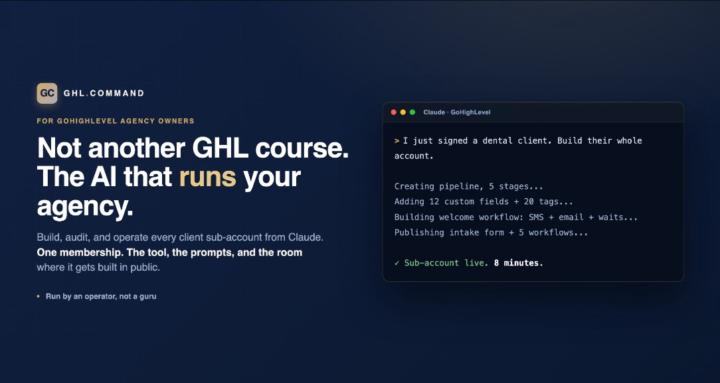
The biggest GHL Command upgrade yet is almost here, and it won't be $97. It's called Command OS, and it's built for agency owners who are done being the bottleneck: - The Cockpit: every client on one screen, a step-by-step account build, and a work queue of what's waiting on you. It runs today on Command OS licenses. - In the next release, now in testing: workflow audits with fix buttons, and a Secret Shopper that tests a client's lead flow like a real prospect. - Coming later: a brain for each client, and campaign templates. When Command OS opens to new members, it sells at its own price, well above $97. So does Command Pro, the version for solo owners. Here's the part my Business Council hates: if you're subscribed to GHL Command at $97 on the day Command OS opens, you get Command OS for that same $97, for as long as you stay subscribed. Lurking here, or on the free read-only version? This is your window. One honest filter: you need GoHighLevel's $297/mo plan or above, because GHL Command needs the API access that plan includes. If you build client accounts yourself, you know the week. You close a client, then do the math on your calendar and realize you sold more of yourself than you have available. The list of what's waiting lives in your head, and only you can finish it. In my own experience, a small account takes me about 6 hours by hand. A med spa, 10 to 12 hours minimum. On October 14, GHL Command built a med spa account in about 19 minutes of Claude working time: a 7-stage pipeline, a calendar, a form, 9 workflows and the message templates. Blueprint writes the build plan first and stops for your OK before it builds anything. The workflows come in as drafts, so nothing fires on a client until you switch it on. That build is in the $97 plan you'd be buying today. ”I've already set it up, I'm using it and it works perfectly." Andres G., agency owner Why $97? My Business Council, the AI advisors in the Claude skills I run my business on, told me on October 14 to charge more for the top tier. I agreed. But our founding rate promises every update included, so $97 members don't pay that price. I gave away free care for years as a chiropractor. Old habits die hard.

1-30 of 169
Suggested communities
Powered by